History of ContainerD
Origin from Docker: The origins of containerd can be traced back to Docker, the popular container platform. Docker initially included all components required to run a container in a single monolithic binary, which included the container runtime. As Docker grew, there was a need to break down this monolithic structure into more manageable, modular components.
Announcement and Spin-Off (2016): Docker announced containerd in December 2016 as a core component split off from the Docker Engine. This move was part of Docker's effort to modularize its platform. containerd was designed to manage the entire container lifecycle, including image transfer and storage, container execution and supervision, low-level storage, and network attachments. Donation to CNCF (2017): In March 2017, Docker donated containerd to the Cloud Native Computing Foundation (CNCF), the same foundation that hosts Kubernetes. This move was aimed at fostering an open, neutral, and community-driven base for container operations.
Graduation from CNCF (2019): containerd graduated from CNCF in February 2019, which indicated its maturity, stable API, and growing adoption. Graduation from CNCF is a significant milestone that reflects a project’s sustainability and adherence to certain standards of governance.
Adoption and Usage: Over the years, containerd has seen significant adoption in the industry. It is used by Kubernetes, as well as cloud providers and Linux distributions for their container operations. This wide adoption is due to its simplicity, robustness, and the strong community support it has garnered.
Containerd & Kubernetes CRI Architecture Flow
The following diagram illustrates how the Kubernetes kubelet talks to containerd via the Container Runtime Interface (CRI) over gRPC, and how containerd delegates execution to containerd-shim and runc:
flowchart TD
    subgraph KubeletLayer ["☸️ Kubernetes Node Agent"]
        Kubelet["kubelet (Node Lifecycle Manager)"]
    end

    subgraph CRILayer ["Container Runtime Interface (CRI)"]
        GRPC["gRPC Socket: /run/containerd/containerd.sock"]
        CRI_Plugin["🔌 containerd CRI Plugin"]
        Kubelet -->|"RuntimeService & ImageService"| GRPC
        GRPC --> CRI_Plugin
    end

    subgraph ContainerdCore ["📦 containerd Daemon Core"]
        CRI_Plugin --> Services

        subgraph Services ["Core Services"]
            ImageSvc["🖼️ Images & Content Store<br/>(OCI Blobs, Tarballs)"]
            SnapSvc["📂 Snapshotter<br/>(overlayfs / devmapper)"]
            TaskSvc["⚙️ Tasks Service<br/>(Process supervisor)"]
            MetaSvc["📋 Metadata Store<br/>(BoltDB)"]
        end
    end

    subgraph ExecutionLayer ["🏃 Container Execution Boundary"]
        TaskSvc -->|"spawns"| Shim1["⚡ containerd-shim-runc-v2 (Pod A)"]
        TaskSvc -->|"spawns"| Shim2["⚡ containerd-shim-runc-v2 (Pod B)"]

        Shim1 --> Runc1["runc (OCI Runtime)"]
        Shim2 --> Runc2["runc (OCI Runtime)"]

        Runc1 -->|"creates & exits"| C1["Container 1<br/>(Namespaces + Cgroups)"]
        Runc2 -->|"creates & exits"| C2["Container 2<br/>(Namespaces + Cgroups)"]

        Shim1 -.->|"stays alive, reaps exit codes"| C1
        Shim2 -.->|"stays alive, reaps exit codes"| C2
    end
Tooling Matrix: crictl vs nerdctl vs ctr
flowchart LR
User["👨💻 DevOps / Cluster Engineer"]
subgraph CLIs ["Command Line Interfaces"]
CRICTL["🔧 crictl<br/>(Kubernetes CRI Debugger)"]
NERDCTL["🚀 nerdctl<br/>(Docker-compatible CLI)"]
CTR["⚙️ ctr<br/>(Low-level Developer Tool)"]
end
subgraph ContainerdNS ["containerd Namespaces"]
K8sNS["Namespace: k8s.io<br/>(Kubernetes Pods & Images)"]
MobyNS["Namespace: moby<br/>(Docker Engine Containers)"]
DefaultNS["Namespace: default<br/>(Standard testing)"]
end
User --> CRICTL
User --> NERDCTL
User --> CTR
CRICTL -->|"Works only via CRI gRPC"| K8sNS
NERDCTL -->|"Full support for Compose, Build"| K8sNS
NERDCTL -->|"Can target any namespace"| DefaultNS
CTR -->|"Direct containerd API access"| K8sNS
CTR --> DefaultNS
CTR --> MobyNS
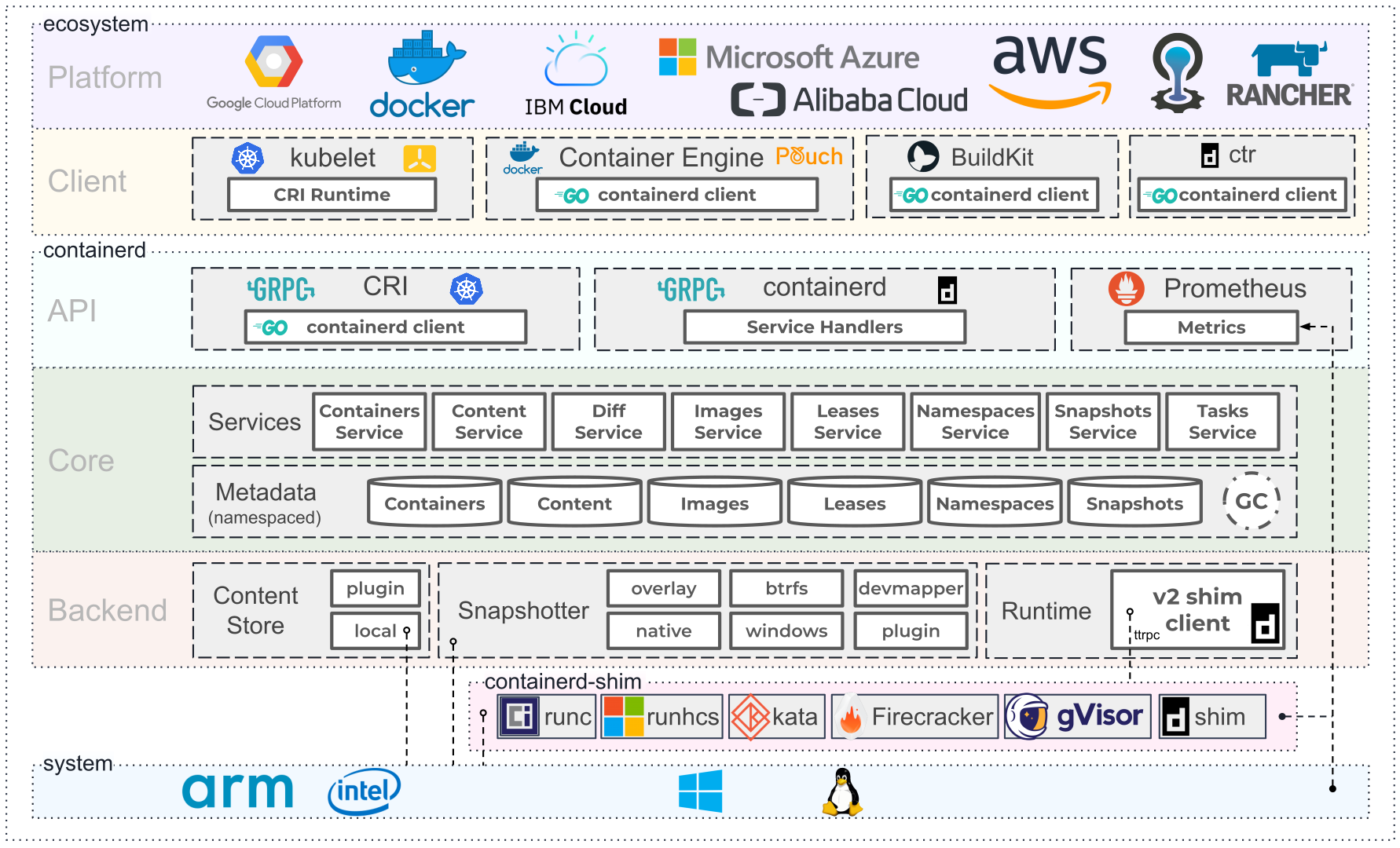
This diagram represents the architecture of containerd, an industry-standard core container runtime. It is designed to be less opinionated and can be used as a base for building a more complex container platform. Let's break down the architecture depicted in the image:
Ecosystem Layer
The topmost layer is the ecosystem that interacts with containerd. It includes:
-
Platforms: Cloud platforms and container orchestration systems that use containerd as their runtime, such as Google Cloud Platform, Docker, IBM Cloud, Microsoft Azure, Alibaba Cloud, AWS, and others.
-
Clients: Tools that interact with containerd, like kubectl for Kubernetes, Docker CLI, ctr (containerd's own CLI tool), BuildKit for building containers, and others.
-
CRI Runtime: containerd is compatible with the Kubernetes Container Runtime Interface (CRI), making it possible to use containerd as the runtime in Kubernetes.
containerd Layer
This is the core of containerd, divided into several components:
-
API: The gRPC API layer through which clients communicate with containerd. It defines service handlers for various container management tasks.
-
Service Handlers: These are gRPC services that handle API requests. They include services for managing containers, images, snapshots, tasks, namespaces, and more.
Core Layer
This is where the main functionality of containerd resides:
-
Services: These are the backend services that do the actual work. They include: Containers Service: Manages container metadata.
-
Content Service: Manages the storage and retrieval of content like layers and config.
-
Diff Service: Handles layer diff computations.
-
Images Service: Manages image metadata. Leases Service: Manages client leases for resources.
-
Namespaces Service: Provides multi-tenancy by segregating resources per namespace.
-
Snapshots Service: Manages filesystem snapshots.
-
Tasks Service: Manages the execution of containers.
Backend Layer
The backend consists of the components that interact with the host system:
-
Content Store: Storage for content like container images. This can be local storage or a plugin.
-
Snapshotter: Handles the creation of filesystem snapshots. There are various snapshotter plugins available, including overlay, btrfs, devmapper, native, and windows.
-
Runtime: This is where the containers are actually run. containerd supports multiple runtimes:
-
runc: The default OCI runtime for Linux containers.
-
runhcs: A runtime for running Windows containers.
-
Kata Containers: Provides lightweight VMs that offer more isolation than traditional container environments.
-
Firecracker: A microVM manager for creating and managing microVMs. gVisor: A user-space kernel for providing sandboxed environments.
-
V2 shim client: A newer version of the shim that manages the lifecycle of the containers and the host processes related to it.
System Layer
The bottom layer represents the system dependencies:
-
Operating Systems: The diagram shows containerd being compatible with ARM and Intel architectures, indicating cross-platform support.
-
Linux Penguins: Symbolizes that containerd is a Linux-native technology, but it also supports Windows as indicated by the "windows" snapshotter. Metrics Off to the side, there is a connection to Prometheus, which is a monitoring system that collects metrics. containerd has built-in support for exporting metrics that Prometheus can scrape and use for monitoring and alerting.
-
Overall, containerd is designed to handle the lifecycle of containers and images in a container system, manage storage and execution, and allow for extensive customization through plugins and external tooling. It is a key component in many modern container platforms, offering a balance between functionality and flexibility.
install ruc
sangam@sangam:~$ sudo apt-get -y install runc
Reading package lists... Done
Building dependency tree... Done
Reading state information... Done
runc is already the newest version (1.1.7-0ubuntu1~22.04.2).
0 upgraded, 0 newly installed, 0 to remove and 0 not upgraded.


sangam@sangam:~$ runc
NAME:
   runc - Open Container Initiative runtime

runc is a command line client for running applications packaged according to
the Open Container Initiative (OCI) format and is a compliant implementation of the
Open Container Initiative specification.

runc integrates well with existing process supervisors to provide a production
container runtime environment for applications. It can be used with your
existing process monitoring tools and the container will be spawned as a
direct child of the process supervisor.

Containers are configured using bundles. A bundle for a container is a directory
that includes a specification file named "config.json" and a root filesystem.
The root filesystem contains the contents of the container.

To start a new instance of a container:

    # runc run [ -b bundle ] <container-id>

Where "<container-id>" is your name for the instance of the container that you
are starting. The name you provide for the container instance must be unique on
your host. Providing the bundle directory using "-b" is optional. The default
value for "bundle" is the current directory.

USAGE:
   runc [global options] command [command options] [arguments...]

VERSION:
   1.1.7-0ubuntu1~22.04.2
spec: 1.0.2-dev
go: go1.18.1
libseccomp: 2.5.3

COMMANDS:
   checkpoint  checkpoint a running container
   create      create a container
   delete      delete any resources held by the container often used with detached container
   events      display container events such as OOM notifications, cpu, memory, and IO usage statistics
   exec        execute new process inside the container
   kill        kill sends the specified signal (default: SIGTERM) to the container's init process
   list        lists containers started by runc with the given root
   pause       pause suspends all processes inside the container
   ps          ps displays the processes running inside a container
   restore     restore a container from a previous checkpoint
   resume      resumes all processes that have been previously paused
   run         create and run a container
   spec        create a new specification file
   start       executes the user defined process in a created container
   state       output the state of a container
   update      update container resource constraints
   features    show the enabled features
   help, h     Shows a list of commands or help for one command

GLOBAL OPTIONS:
   --debug             enable debug logging
   --log value         set the log file to write runc logs to (default is '/dev/stderr')
   --log-format value  set the log format ('text' (default), or 'json') (default: "text")
   --root value        root directory for storage of container state (this should be located in tmpfs) (default: "/run/user/1000/runc")
   --criu value        path to the criu binary used for checkpoint and restore (default: "criu")
   --systemd-cgroup    enable systemd cgroup support, expects cgroupsPath to be of form "slice:prefix:name" for e.g. "system.slice:runc:434234"
   --rootless value    ignore cgroup permission errors ('true', 'false', or 'auto') (default: "auto")
   --help, -h          show help
   --version, -v       print the version
sangam@sangam:~$
create directory
sangam@sangam:~$ mkdir runc-sangam-demo
sangam@sangam:~$ cd runc-sangam-demo/
once installed, you can start using runc:
Creating a Container
Create a Root Filesystem: You need a root filesystem for your container. You can create a simple one or use an existing Docker image. Example: mkdir rootfs and unpack a Docker image into it using docker export and tar.
mkdir rootfs
Export the filesystem of an existing Docker image (e.g., alphine)
sudo docker pull alpine
Using default tag: latest
latest: Pulling from library/alpine
bca4290a9639: Pull complete
Digest: sha256:c5b1261d6d3e43071626931fc004f70149baeba2c8ec672bd4f27761f8e1ad6b
Status: Downloaded newer image for alpine:latest
docker.io/library/alpine:latest

docker export $(docker create alpine) | tar -C rootfs -xvf -
it will give us two files
sangam@sangam:~/runc-sangam-demo$ ls
config.json  rootfs
check it out config.json file
sangam@sangam:~/runc-sangam-demo$ cat config.json
{
	"ociVersion": "1.0.2-dev",
	"process": {
		"terminal": true,
		"user": {
			"uid": 0,
			"gid": 0
		},
		"args": [
			"sh"
		],
		"env": [
			"PATH=/usr/local/sbin:/usr/local/bin:/usr/sbin:/usr/bin:/sbin:/bin",
			"TERM=xterm"
		],
		"cwd": "/",
		"capabilities": {
			"bounding": [
				"CAP_AUDIT_WRITE",
				"CAP_KILL",
				"CAP_NET_BIND_SERVICE"
			],
			"effective": [
				"CAP_AUDIT_WRITE",
				"CAP_KILL",
				"CAP_NET_BIND_SERVICE"
			],
			"permitted": [
				"CAP_AUDIT_WRITE",
				"CAP_KILL",
				"CAP_NET_BIND_SERVICE"
			],
			"ambient": [
				"CAP_AUDIT_WRITE",
				"CAP_KILL",
				"CAP_NET_BIND_SERVICE"
			]
		},
		"rlimits": [
			{
				"type": "RLIMIT_NOFILE",
				"hard": 1024,
				"soft": 1024
			}
		],
		"noNewPrivileges": true
	},
	"root": {
		"path": "rootfs",
		"readonly": true
	},
	"hostname": "runc",
	"mounts": [
		{
			"destination": "/proc",
			"type": "proc",
			"source": "proc"
		},
		{
			"destination": "/dev",
			"type": "tmpfs",
			"source": "tmpfs",
			"options": [
				"nosuid",
				"strictatime",
				"mode=755",
				"size=65536k"
			]
		},
		{
			"destination": "/dev/pts",
			"type": "devpts",
			"source": "devpts",
			"options": [
				"nosuid",
				"noexec",
				"newinstance",
				"ptmxmode=0666",
				"mode=0620",
				"gid=5"
			]
		},
		{
			"destination": "/dev/shm",
			"type": "tmpfs",
			"source": "shm",
			"options": [
				"nosuid",
				"noexec",
				"nodev",
				"mode=1777",
				"size=65536k"
			]
		},
		{
			"destination": "/dev/mqueue",
			"type": "mqueue",
			"source": "mqueue",
			"options": [
				"nosuid",
				"noexec",
				"nodev"
			]
		},
		{
			"destination": "/sys",
			"type": "sysfs",
			"source": "sysfs",
			"options": [
				"nosuid",
				"noexec",
				"nodev",
				"ro"
			]
		},
		{
			"destination": "/sys/fs/cgroup",
			"type": "cgroup",
			"source": "cgroup",
			"options": [
				"nosuid",
				"noexec",
				"nodev",
				"relatime",
				"ro"
			]
		}
	],
	"linux": {
		"resources": {
			"devices": [
				{
					"allow": false,
					"access": "rwm"
				}
			]
		},
		"namespaces": [
			{
				"type": "pid"
			},
			{
				"type": "network"
			},
			{
				"type": "ipc"
			},
			{
				"type": "uts"
			},
			{
				"type": "mount"
			},
			{
				"type": "cgroup"
			}
		],
		"maskedPaths": [
			"/proc/acpi",
			"/proc/asound",
			"/proc/kcore",
			"/proc/keys",
			"/proc/latency_stats",
			"/proc/timer_list",
			"/proc/timer_stats",
			"/proc/sched_debug",
			"/sys/firmware",
			"/proc/scsi"
		],
		"readonlyPaths": [
			"/proc/bus",
			"/proc/fs",
			"/proc/irq",
			"/proc/sys",
			"/proc/sysrq-trigger"
		]
	}
}
config file in depth
ociVersion
ociVersion: Specifies the OCI Runtime Specification version that the configuration is compatible with.
process
This section details how the process inside the container should be run.
- terminal: If set to true, a terminal is attached to the process.
- user: Specifies the UID and GID for the process.
- args: Arguments for the process to be run inside the container. In your case, it starts a shell (sh).
- env: Environment variables.
- cwd: Current working directory inside the container.
- capabilities: Linux capabilities that the process inside the container can use.
- rlimits: Resource limits for the process (e.g., number of open files).
- noNewPrivileges: If true, the process is not allowed to gain new privileges.
root
-
path: The path to the root filesystem relative to the location of the config.json file. Here, it's set to use the rootfs directory.
-
readonly: If true, the root filesystem is mounted as read-only.
hostname
- hostname: The hostname set for the container.
mounts
This section defines filesystems or directories that are mounted in the container.
- destination: Where the mount will be placed inside the container.
- type: The type of the filesystem to be mounted (e.g., proc, tmpfs).
- source: The source of the mount.
- options: Mount options.
linux
This section contains Linux-specific configurations.
- resources: Controls how the container can interact with system resources.
- namespaces: Namespaces provide isolation for the container. Common namespaces include pid, network, ipc, uts, mount, and cgroup.
- maskedPaths: Paths that should be hidden from the container.
- readonlyPaths: Paths that should be read-only inside the container.
runc run - create and run a container
runc spec --help
NAME:
   runc spec - create a new specification file

USAGE:
   runc spec [command options] [arguments...]

DESCRIPTION:
   The spec command creates the new specification file named "config.json" for
the bundle.

The spec generated is just a starter file. Editing of the spec is required to
achieve desired results. For example, the newly generated spec includes an args
parameter that is initially set to call the "sh" command when the container is
started. Calling "sh" may work for an ubuntu container or busybox, but will not
work for containers that do not include the "sh" program.

EXAMPLE:
  To run docker's hello-world container one needs to set the args parameter
in the spec to call hello. This can be done using the sed command or a text
editor. The following commands create a bundle for hello-world, change the
default args parameter in the spec from "sh" to "/hello", then run the hello
command in a new hello-world container named container1:

    mkdir hello
    cd hello
    docker pull hello-world
    docker export $(docker create hello-world) > hello-world.tar
    mkdir rootfs
    tar -C rootfs -xf hello-world.tar
    runc spec
    sed -i 's;"sh";"/hello";' config.json
    runc run container1

In the run command above, "container1" is the name for the instance of the
container that you are starting. The name you provide for the container instance
must be unique on your host.

An alternative for generating a customized spec config is to use "oci-runtime-tool", the
sub-command "oci-runtime-tool generate" has lots of options that can be used to do any
customizations as you want, see runtime-tools (https://github.com/opencontainers/runtime-tools)
to get more information.

When starting a container through runc, runc needs root privilege. If not
already running as root, you can use sudo to give runc root privilege. For
example: "sudo runc start container1" will give runc root privilege to start the
container on your host.

Alternatively, you can start a rootless container, which has the ability to run
without root privileges. For this to work, the specification file needs to be
adjusted accordingly. You can pass the parameter --rootless to this command to
generate a proper rootless spec file.

Note that --rootless is not needed when you execute runc as the root in a user namespace
created by an unprivileged user.


OPTIONS:
   --bundle value, -b value  path to the root of the bundle directory
   --rootless                generate a configuration for a rootless container
lets create
sangam@sangam:~/runc-sangam-demo$ sudo runc create --bundle . container1
sangam@sangam:~/runc-sangam-demo$ sudo runc list
ID           PID         STATUS      BUNDLE                          CREATED                         OWNER
container1   379391      created     /home/sangam/runc-sangam-demo   2024-02-08T16:08:52.31926604Z   root
list all namespaces
sangam@sangam:~/runc-sangam-demo$ sudo lsns
        NS TYPE   NPROCS    PID USER             COMMAND
4026531834 time      221      1 root             /sbin/init
4026531835 cgroup    220      1 root             /sbin/init
4026531836 pid       208      1 root             /sbin/init
4026531837 user      221      1 root             /sbin/init
4026531838 uts       217      1 root             /sbin/init
4026531839 ipc       208      1 root             /sbin/init
4026531840 net       220      1 root             /sbin/init
4026531841 mnt       202      1 root             /sbin/init
4026531862 mnt         1     25 root             kdevtmpfs
4026532545 mnt         1    561 root             /lib/systemd/systemd-udevd
4026532546 uts         1    561 root             /lib/systemd/systemd-udevd
4026532626 mnt         1    714 systemd-timesync /lib/systemd/systemd-timesyncd
4026532627 uts         1    714 systemd-timesync /lib/systemd/systemd-timesyncd
4026532628 mnt         1    821 systemd-network  /lib/systemd/systemd-networkd
4026532629 mnt         1    823 systemd-resolve  /lib/systemd/systemd-resolved
4026532660 mnt         1   2373 65535            /pause
4026532661 ipc        12   2373 65535            /pause
4026532662 pid         1   2373 65535            /pause
4026532663 mnt        11   2662 root             /usr/local/bin/runsvdir -P /etc/service/enabled
4026532664 pid        11   2662 root             /usr/local/bin/runsvdir -P /etc/service/enabled
4026532666 mnt         1 379391 root             runc init
4026532667 uts         1 379391 root             runc init
4026532668 ipc         1 379391 root             runc init
4026532669 pid         1 379391 root             runc init
4026532670 net         1 379391 root             runc init
4026532713 mnt         1    869 root             /lib/systemd/systemd-logind
4026532714 uts         1    869 root             /lib/systemd/systemd-logind
4026532732 cgroup      1 379391 root             runc init
list of all running processes on your system, including details about the user running each process, CPU and memory usage, the process ID (PID), the parent process ID (PPID), and more.
sangam@sangam:~/runc-sangam-demo$ ps auxf
USER PID %CPU %MEM VSZ RSS TTY STAT START TIME COMMAND
root 2 0.0 0.0 0 0 ? S 11:32 0:00 [kthreadd]
root 3 0.0 0.0 0 0 ? I< 11:32 0:00 \_ [rcu_gp]
root 4 0.0 0.0 0 0 ? I< 11:32 0:00 \_ [rcu_par_gp]
root 5 0.0 0.0 0 0 ? I< 11:32 0:00 \_ [slub_flushwq]
root 6 0.0 0.0 0 0 ? I< 11:32 0:00 \_ [netns]
root 8 0.0 0.0 0 0 ? I< 11:32 0:00 \_ [kworker/0:0H-events_highpri]
root 10 0.0 0.0 0 0 ? I< 11:32 0:00 \_ [mm_percpu_wq]
root 11 0.0 0.0 0 0 ? S 11:32 0:00 \_ [rcu_tasks_rude_]
root 12 0.0 0.0 0 0 ? S 11:32 0:00 \_ [rcu_tasks_trace]
root 13 0.0 0.0 0 0 ? S 11:32 0:01 \_ [ksoftirqd/0]
root 14 0.0 0.0 0 0 ? I 11:32 0:06 \_ [rcu_sched]
root 15 0.0 0.0 0 0 ? S 11:32 0:00 \_ [migration/0]
root 16 0.0 0.0 0 0 ? S 11:32 0:00 \_ [idle_inject/0]
root 18 0.0 0.0 0 0 ? S 11:32 0:00 \_ [cpuhp/0]
root 19 0.0 0.0 0 0 ? S 11:32 0:00 \_ [cpuhp/1]
root 20 0.0 0.0 0 0 ? S 11:32 0:00 \_ [idle_inject/1]
root 21 0.0 0.0 0 0 ? S 11:32 0:00 \_ [migration/1]
root 22 0.0 0.0 0 0 ? S 11:32 0:01 \_ [ksoftirqd/1]
root 24 0.0 0.0 0 0 ? I< 11:32 0:00 \_ [kworker/1:0H-events_highpri]
root 25 0.0 0.0 0 0 ? S 11:32 0:00 \_ [kdevtmpfs]
root 26 0.0 0.0 0 0 ? I< 11:32 0:00 \_ [inet_frag_wq]
root 28 0.0 0.0 0 0 ? S 11:32 0:00 \_ [kauditd]
root 29 0.0 0.0 0 0 ? S 11:32 0:00 \_ [khungtaskd]
root 30 0.0 0.0 0 0 ? S 11:32 0:00 \_ [oom_reaper]
root 31 0.0 0.0 0 0 ? I< 11:32 0:00 \_ [writeback]
root 32 0.0 0.0 0 0 ? S 11:32 0:00 \_ [kcompactd0]
root 33 0.0 0.0 0 0 ? SN 11:32 0:00 \_ [ksmd]
root 34 0.0 0.0 0 0 ? SN 11:32 0:00 \_ [khugepaged]
root 80 0.0 0.0 0 0 ? I< 11:32 0:00 \_ [kintegrityd]
root 81 0.0 0.0 0 0 ? I< 11:32 0:00 \_ [kblockd]
root 82 0.0 0.0 0 0 ? I< 11:32 0:00 \_ [blkcg_punt_bio]
root 83 0.0 0.0 0 0 ? I< 11:32 0:00 \_ [tpm_dev_wq]
root 84 0.0 0.0 0 0 ? I< 11:32 0:00 \_ [ata_sff]
root 85 0.0 0.0 0 0 ? I< 11:32 0:00 \_ [md]
root 86 0.0 0.0 0 0 ? I< 11:32 0:00 \_ [edac-poller]
root 87 0.0 0.0 0 0 ? I< 11:32 0:00 \_ [devfreq_wq]
root 88 0.0 0.0 0 0 ? S 11:32 0:00 \_ [watchdogd]
root 90 0.0 0.0 0 0 ? I< 11:32 0:00 \_ [kworker/0:1H-kblockd]
root 91 0.0 0.0 0 0 ? S 11:32 0:00 \_ [kswapd0]
root 92 0.0 0.0 0 0 ? S 11:32 0:00 \_ [ecryptfs-kthrea]
root 94 0.0 0.0 0 0 ? I< 11:32 0:00 \_ [kthrotld]
root 95 0.0 0.0 0 0 ? S 11:32 0:00 \_ [irq/13-pciehp]
root 96 0.0 0.0 0 0 ? S 11:32 0:00 \_ [irq/14-pciehp]
root 97 0.0 0.0 0 0 ? S 11:32 0:00 \_ [irq/15-pciehp]
root 98 0.0 0.0 0 0 ? S 11:32 0:00 \_ [irq/16-pciehp]
root 99 0.0 0.0 0 0 ? S 11:32 0:00 \_ [irq/17-pciehp]
root 100 0.0 0.0 0 0 ? S 11:32 0:00 \_ [irq/18-pciehp]
root 101 0.0 0.0 0 0 ? S 11:32 0:00 \_ [irq/19-pciehp]
root 102 0.0 0.0 0 0 ? S 11:32 0:00 \_ [irq/20-pciehp]
root 103 0.0 0.0 0 0 ? S 11:32 0:00 \_ [irq/21-pciehp]
root 104 0.0 0.0 0 0 ? S 11:32 0:00 \_ [irq/22-pciehp]
root 105 0.0 0.0 0 0 ? S 11:32 0:00 \_ [irq/23-pciehp]
root 106 0.0 0.0 0 0 ? S 11:32 0:00 \_ [irq/24-pciehp]
root 107 0.0 0.0 0 0 ? S 11:32 0:00 \_ [irq/25-pciehp]
root 108 0.0 0.0 0 0 ? S 11:32 0:00 \_ [irq/26-pciehp]
root 109 0.0 0.0 0 0 ? S 11:32 0:00 \_ [irq/27-pciehp]
root 110 0.0 0.0 0 0 ? S 11:32 0:00 \_ [irq/28-pciehp]
root 111 0.0 0.0 0 0 ? S 11:32 0:00 \_ [irq/29-pciehp]
root 112 0.0 0.0 0 0 ? S 11:32 0:00 \_ [irq/30-pciehp]
root 113 0.0 0.0 0 0 ? S 11:32 0:00 \_ [irq/31-pciehp]
root 114 0.0 0.0 0 0 ? S 11:32 0:00 \_ [irq/32-pciehp]
root 115 0.0 0.0 0 0 ? S 11:32 0:00 \_ [irq/33-pciehp]
root 116 0.0 0.0 0 0 ? S 11:32 0:00 \_ [irq/34-pciehp]
root 117 0.0 0.0 0 0 ? S 11:32 0:00 \_ [irq/35-pciehp]
root 118 0.0 0.0 0 0 ? S 11:32 0:00 \_ [irq/36-pciehp]
root 119 0.0 0.0 0 0 ? S 11:32 0:00 \_ [irq/37-pciehp]
root 120 0.0 0.0 0 0 ? S 11:32 0:00 \_ [irq/38-pciehp]
root 121 0.0 0.0 0 0 ? S 11:32 0:00 \_ [irq/39-pciehp]
root 122 0.0 0.0 0 0 ? S 11:32 0:00 \_ [irq/40-pciehp]
root 123 0.0 0.0 0 0 ? S 11:32 0:00 \_ [irq/41-pciehp]
root 124 0.0 0.0 0 0 ? S 11:32 0:00 \_ [irq/42-pciehp]
root 125 0.0 0.0 0 0 ? S 11:32 0:00 \_ [irq/43-pciehp]
root 126 0.0 0.0 0 0 ? S 11:32 0:00 \_ [irq/44-pciehp]
root 127 0.0 0.0 0 0 ? I< 11:32 0:00 \_ [acpi_thermal_pm]
root 129 0.0 0.0 0 0 ? I< 11:32 0:00 \_ [mld]
root 130 0.0 0.0 0 0 ? I< 11:32 0:00 \_ [ipv6_addrconf]
root 140 0.0 0.0 0 0 ? I< 11:32 0:00 \_ [kstrp]
root 144 0.0 0.0 0 0 ? I< 11:32 0:00 \_ [zswap-shrink]
root 145 0.0 0.0 0 0 ? I< 11:32 0:00 \_ [kworker/u5:0]
root 148 0.0 0.0 0 0 ? I< 11:32 0:00 \_ [cryptd]
root 187 0.0 0.0 0 0 ? I< 11:32 0:00 \_ [charger_manager]
root 211 0.0 0.0 0 0 ? I< 11:32 0:00 \_ [kworker/1:1H-kblockd]
root 234 0.0 0.0 0 0 ? I< 11:32 0:00 \_ [nvme-wq]
root 235 0.0 0.0 0 0 ? I< 11:32 0:00 \_ [nvme-reset-wq]
root 236 0.0 0.0 0 0 ? I< 11:32 0:00 \_ [nvme-delete-wq]
root 238 0.0 0.0 0 0 ? S 11:32 0:00 \_ [scsi_eh_0]
root 239 0.0 0.0 0 0 ? I< 11:32 0:00 \_ [scsi_tmf_0]
root 240 0.0 0.0 0 0 ? S 11:32 0:00 \_ [scsi_eh_1]
root 241 0.0 0.0 0 0 ? I< 11:32 0:00 \_ [scsi_tmf_1]
root 242 0.0 0.0 0 0 ? S 11:32 0:00 \_ [scsi_eh_2]
root 243 0.0 0.0 0 0 ? I< 11:32 0:00 \_ [scsi_tmf_2]
root 244 0.0 0.0 0 0 ? S 11:32 0:00 \_ [scsi_eh_3]
root 259 0.0 0.0 0 0 ? I< 11:32 0:00 \_ [scsi_tmf_3]
root 261 0.0 0.0 0 0 ? S 11:32 0:00 \_ [scsi_eh_4]
root 265 0.0 0.0 0 0 ? I< 11:32 0:00 \_ [scsi_tmf_4]
root 267 0.0 0.0 0 0 ? S 11:32 0:00 \_ [scsi_eh_5]
root 268 0.0 0.0 0 0 ? I< 11:32 0:00 \_ [scsi_tmf_5]
root 271 0.0 0.0 0 0 ? S 11:32 0:00 \_ [scsi_eh_6]
root 273 0.0 0.0 0 0 ? I< 11:32 0:00 \_ [scsi_tmf_6]
root 276 0.0 0.0 0 0 ? I< 11:32 0:00 \_ [ttm_swap]
root 277 0.0 0.0 0 0 ? S 11:32 0:00 \_ [scsi_eh_7]
root 279 0.0 0.0 0 0 ? S 11:32 0:02 \_ [irq/45-vmwgfx]
root 281 0.0 0.0 0 0 ? S 11:32 0:00 \_ [card0-crtc0]
root 282 0.0 0.0 0 0 ? S 11:32 0:00 \_ [card0-crtc1]
root 283 0.0 0.0 0 0 ? S 11:32 0:00 \_ [card0-crtc2]
root 284 0.0 0.0 0 0 ? S 11:32 0:00 \_ [card0-crtc3]
root 285 0.0 0.0 0 0 ? S 11:32 0:00 \_ [card0-crtc4]
root 286 0.0 0.0 0 0 ? S 11:32 0:00 \_ [card0-crtc5]
root 287 0.0 0.0 0 0 ? S 11:32 0:00 \_ [card0-crtc6]
root 288 0.0 0.0 0 0 ? S 11:32 0:00 \_ [card0-crtc7]
root 289 0.0 0.0 0 0 ? I< 11:32 0:00 \_ [scsi_tmf_7]
root 293 0.0 0.0 0 0 ? S 11:32 0:00 \_ [scsi_eh_8]
root 295 0.0 0.0 0 0 ? I< 11:32 0:00 \_ [scsi_tmf_8]
root 296 0.0 0.0 0 0 ? S 11:32 0:00 \_ [scsi_eh_9]
root 298 0.0 0.0 0 0 ? I< 11:32 0:00 \_ [scsi_tmf_9]
root 300 0.0 0.0 0 0 ? S 11:32 0:00 \_ [scsi_eh_10]
root 301 0.0 0.0 0 0 ? I< 11:32 0:00 \_ [scsi_tmf_10]
root 302 0.0 0.0 0 0 ? S 11:32 0:00 \_ [scsi_eh_11]
root 304 0.0 0.0 0 0 ? I< 11:32 0:00 \_ [scsi_tmf_11]
root 305 0.0 0.0 0 0 ? S 11:32 0:00 \_ [scsi_eh_12]
root 307 0.0 0.0 0 0 ? I< 11:32 0:00 \_ [scsi_tmf_12]
root 308 0.0 0.0 0 0 ? S 11:32 0:00 \_ [scsi_eh_13]
root 310 0.0 0.0 0 0 ? I< 11:32 0:00 \_ [scsi_tmf_13]
root 315 0.0 0.0 0 0 ? S 11:32 0:00 \_ [scsi_eh_14]
root 316 0.0 0.0 0 0 ? I< 11:32 0:00 \_ [scsi_tmf_14]
root 317 0.0 0.0 0 0 ? S 11:32 0:00 \_ [scsi_eh_15]
root 319 0.0 0.0 0 0 ? I< 11:32 0:00 \_ [scsi_tmf_15]
root 321 0.0 0.0 0 0 ? S 11:32 0:00 \_ [scsi_eh_16]
root 322 0.0 0.0 0 0 ? I< 11:32 0:00 \_ [scsi_tmf_16]
root 323 0.0 0.0 0 0 ? S 11:32 0:00 \_ [scsi_eh_17]
root 324 0.0 0.0 0 0 ? I< 11:32 0:00 \_ [scsi_tmf_17]
root 325 0.0 0.0 0 0 ? S 11:32 0:00 \_ [scsi_eh_18]
root 326 0.0 0.0 0 0 ? I< 11:32 0:00 \_ [scsi_tmf_18]
root 327 0.0 0.0 0 0 ? S 11:32 0:00 \_ [scsi_eh_19]
root 328 0.0 0.0 0 0 ? I< 11:32 0:00 \_ [scsi_tmf_19]
root 329 0.0 0.0 0 0 ? S 11:32 0:00 \_ [scsi_eh_20]
root 330 0.0 0.0 0 0 ? I< 11:32 0:00 \_ [scsi_tmf_20]
root 331 0.0 0.0 0 0 ? S 11:32 0:00 \_ [scsi_eh_21]
root 332 0.0 0.0 0 0 ? I< 11:32 0:00 \_ [scsi_tmf_21]
root 333 0.0 0.0 0 0 ? S 11:32 0:00 \_ [scsi_eh_22]
root 334 0.0 0.0 0 0 ? I< 11:32 0:00 \_ [scsi_tmf_22]
root 335 0.0 0.0 0 0 ? S 11:32 0:00 \_ [scsi_eh_23]
root 336 0.0 0.0 0 0 ? I< 11:32 0:00 \_ [scsi_tmf_23]
root 337 0.0 0.0 0 0 ? S 11:32 0:00 \_ [scsi_eh_24]
root 338 0.0 0.0 0 0 ? I< 11:32 0:00 \_ [scsi_tmf_24]
root 339 0.0 0.0 0 0 ? S 11:32 0:00 \_ [scsi_eh_25]
root 340 0.0 0.0 0 0 ? I< 11:32 0:00 \_ [scsi_tmf_25]
root 341 0.0 0.0 0 0 ? S 11:32 0:00 \_ [scsi_eh_26]
root 342 0.0 0.0 0 0 ? I< 11:32 0:00 \_ [scsi_tmf_26]
root 343 0.0 0.0 0 0 ? S 11:32 0:00 \_ [scsi_eh_27]
root 344 0.0 0.0 0 0 ? I< 11:32 0:00 \_ [scsi_tmf_27]
root 345 0.0 0.0 0 0 ? S 11:32 0:00 \_ [scsi_eh_28]
root 346 0.0 0.0 0 0 ? I< 11:32 0:00 \_ [scsi_tmf_28]
root 347 0.0 0.0 0 0 ? S 11:32 0:00 \_ [scsi_eh_29]
root 348 0.0 0.0 0 0 ? I< 11:32 0:00 \_ [scsi_tmf_29]
root 382 0.0 0.0 0 0 ? I< 11:32 0:00 \_ [kdmflush]
root 416 0.0 0.0 0 0 ? I< 11:32 0:00 \_ [raid5wq]
root 463 0.0 0.0 0 0 ? S 11:32 0:02 \_ [jbd2/dm-0-8]
root 464 0.0 0.0 0 0 ? I< 11:32 0:00 \_ [ext4-rsv-conver]
root 560 0.0 0.0 0 0 ? I< 11:32 0:00 \_ [kaluad]
root 562 0.0 0.0 0 0 ? I< 11:32 0:00 \_ [kmpath_rdacd]
root 564 0.0 0.0 0 0 ? I< 11:32 0:00 \_ [kmpathd]
root 565 0.0 0.0 0 0 ? I< 11:32 0:00 \_ [kmpath_handlerd]
root 686 0.0 0.0 0 0 ? S 11:32 0:00 \_ [jbd2/nvme0n1p2-]
root 688 0.0 0.0 0 0 ? I< 11:32 0:00 \_ [ext4-rsv-conver]
root 1721 0.0 0.0 2184 764 ? S 11:32 0:00 \_ bpfilter_umh
root 2070 0.0 0.0 0 0 ? I< 11:32 0:00 \_ [dio/dm-0]
root 156869 0.0 0.0 0 0 ? I 13:25 0:01 \_ [kworker/u4:1-flush-253:0]
root 313679 0.0 0.0 0 0 ? I 15:20 0:00 \_ [kworker/u4:3-events_unbound]
root 363789 0.0 0.0 0 0 ? I 15:57 0:00 \_ [kworker/0:2-events]
root 365001 0.0 0.0 0 0 ? I 15:58 0:00 \_ [kworker/u4:2-events_unbound]
root 370567 0.0 0.0 0 0 ? I 16:02 0:00 \_ [kworker/1:0-events]
root 378476 0.0 0.0 0 0 ? I 16:08 0:00 \_ [kworker/1:1-events]
root 378512 0.0 0.0 0 0 ? I 16:08 0:00 \_ [kworker/0:1-events]
root 385797 0.0 0.0 0 0 ? I 16:13 0:00 \_ [kworker/0:0-events]
root 1 0.0 0.2 101092 10708 ? Ss 11:32 0:15 /sbin/init
root 526 0.3 8.8 540332 352704 ? S<s 11:32 1:03 /lib/systemd/systemd-journald
root 561 0.0 0.1 25320 5924 ? Ss 11:32 0:00 /lib/systemd/systemd-udevd
root 566 0.0 0.6 289660 25664 ? SLsl 11:32 0:01 /sbin/multipathd -d -s
systemd+ 714 0.0 0.1 88652 6344 ? Ssl 11:32 0:00 /lib/systemd/systemd-timesyncd
systemd+ 821 0.0 0.1 16400 7700 ? Ss 11:32 0:00 /lib/systemd/systemd-networkd
systemd+ 823 0.0 0.2 25204 11580 ? Ss 11:32 0:00 /lib/systemd/systemd-resolved
message+ 843 0.0 0.1 8840 4240 ? Ss 11:32 0:00 @dbus-daemon --system --address=systemd: --nofork --nopidfile --systemd-activation --syslog-on
root 857 0.0 0.4 29952 17636 ? Ss 11:32 0:00 /usr/bin/python3 /usr/bin/networkd-dispatcher --run-startup-triggers
root 860 0.0 0.0 4956 3756 ? Ss 11:32 0:07 /bin/bash /snap/microk8s/6227/apiservice-kicker
root 386729 0.0 0.0 2380 204 ? S 16:14 0:00 \_ sleep 5
root 862 0.0 0.0 4288 3144 ? Ss 11:32 0:00 /bin/bash /snap/microk8s/6227/run-cluster-agent-with-args
root 1398 0.0 0.6 741492 26780 ? Sl 11:32 0:02 \_ /snap/microk8s/6227/bin/cluster-agent cluster-agent --bind 0.0.0.0:25000 --keyfile /var/sn
root 863 0.9 1.2 1560972 48280 ? Ssl 11:32 2:37 /snap/microk8s/6227/bin/containerd --config /var/snap/microk8s/6227/args/containerd.toml --roo
root 866 5.5 5.9 1751344 237952 ? Ssl 11:32 15:38 /snap/microk8s/6227/bin/k8s-dqlite --storage-dir=/var/snap/microk8s/6227/var/kubernetes/backen
root 867 0.0 0.7 1391976 29656 ? Ssl 11:32 0:15 /usr/lib/snapd/snapd
root 869 0.0 0.1 48580 6924 ? Ss 11:32 0:00 /lib/systemd/systemd-logind
root 872 0.1 0.9 1344056 38712 ? Ssl 11:32 0:20 /usr/bin/containerd
root 925 0.0 0.0 2608 808 tty1 Ss+ 11:32 0:00 /sbin/agetty -o -p -- \u --noclear tty1 linux
root 1017 0.0 0.1 15152 7992 ? Ss 11:32 0:00 sshd: /usr/sbin/sshd -D [listener] 0 of 10-100 startups
root 1546 0.0 0.2 18384 9616 ? Ss 11:32 0:00 \_ sshd: sangam [priv]
sangam 1868 0.0 0.1 18516 6568 ? S 11:32 0:00 \_ sshd: sangam@pts/0
sangam 1869 0.0 0.0 4684 3744 pts/0 Ss 11:32 0:00 \_ -bash
sangam 386730 0.0 0.0 8136 3300 pts/0 R+ 16:14 0:00 \_ ps auxf
root 1052 0.0 0.4 107044 19948 ? Ssl 11:32 0:00 /usr/bin/python3 /usr/share/unattended-upgrades/unattended-upgrade-shutdown --wait-for-signal
root 1102 0.0 1.6 1370164 64656 ? Ssl 11:32 0:02 /usr/bin/dockerd -H fd:// --containerd=/run/containerd/containerd.sock
root 1552 6.1 8.9 1055132 360408 ? Ssl 11:32 17:28 /snap/microk8s/6227/kubelite --scheduler-args-file=/var/snap/microk8s/6227/args/kube-scheduler
sangam 1839 0.0 0.2 17340 9064 ? Ss 11:32 0:00 /lib/systemd/systemd --user
sangam 1840 0.0 0.1 105132 5160 ? S 11:32 0:00 \_ (sd-pam)
root 2298 0.1 0.2 719424 10152 ? Sl 11:32 0:29 /snap/microk8s/6227/bin/containerd-shim-runc-v2 -namespace k8s.io -id e3cdeab7e3463dcd4c0d1f96
65535 2373 0.0 0.0 792 4 ? Ss 11:32 0:00 \_ /pause
root 2662 0.0 0.0 1992 504 ? Ss 11:32 0:00 \_ /usr/local/bin/runsvdir -P /etc/service/enabled
root 2738 0.0 0.0 1840 496 ? Ss 11:32 0:00 \_ runsv monitor-addresses
root 2744 0.0 1.1 1224388 44816 ? Sl 11:32 0:01 | \_ calico-node -monitor-addresses
root 2739 0.0 0.0 1840 520 ? Ss 11:32 0:00 \_ runsv node-status-reporter
root 2745 0.1 1.2 1224388 50936 ? Sl 11:32 0:17 | \_ calico-node -status-reporter
root 2740 0.0 0.0 1840 516 ? Ss 11:32 0:00 \_ runsv felix
root 2747 2.0 1.4 1667548 58712 ? Sl 11:32 5:51 | \_ calico-node -felix
root 2741 0.0 0.0 1840 512 ? Ss 11:32 0:00 \_ runsv cni
root 2743 0.0 1.1 1224388 44616 ? Sl 11:32 0:00 | \_ calico-node -monitor-token
root 2742 0.0 0.0 1840 540 ? Ss 11:32 0:00 \_ runsv allocate-tunnel-addrs
root 2746 0.1 1.3 1298376 55568 ? Sl 11:32 0:27 \_ calico-node -allocate-tunnel-addrs
root 379391 0.0 0.2 1007224 8808 ? Ssl 16:08 0:00 runc init
start container and check state of container
sangam@sangam:~/runc-sangam-demo$ sudo runc run container1
y
y ...

yy
kill the container 1 process
sangam@sangam:~$ sudo runc kill container1 SIGKILL
Cheatsheet - Runc Commands for Managing Containers
The following table provides an overview of various runc commands and their usage, demonstrated with an Alpine Linux container named container1.
| Command | Description | Example Usage |
|---|---|---|
spec |
Create a new specification file for the container. | sudo runc spec |
create |
Create a container instance based on the spec file. | sudo runc create container1 |
start |
Start the container's init process. | sudo runc start container1 |
list |
List containers managed by runc. |
sudo runc list |
exec |
Execute a command inside the running container. | sudo runc exec container1 ls |
state |
Output the state of a specified container. | sudo runc state container1 |
pause |
Pause all processes within the container. | sudo runc pause container1 |
resume |
Resume all processes that have been previously paused. | sudo runc resume container1 |
delete |
Delete the container (only if it's not running). | sudo runc delete container1 |
Remember to edit the config.json file to specify the Alpine Linux root filesystem and adjust other configurations as necessary for your setup.
update ubuntu server
sudo apt-get update
Install the necessary packages
sudo apt-get install apt-transport-https ca-certificates curl software-properties-common
install docker
curl -fsSL https://download.docker.com/linux/ubuntu/gpg | sudo apt-key add -
Install Containerd
sudo apt-get install containerd -y
Reading package lists... Done
Building dependency tree... Done
Reading state information... Done
containerd is already the newest version (1.7.2-0ubuntu1~22.04.1).
containerd set to manually installed.
0 upgraded, 0 newly installed, 0 to remove and 0 not upgraded.
Configure ContainerD
sudo mkdir -p /etc/containerd
sudo su -
containerd config default /etc/containerd/config.toml
containerd config default /etc/containerd/config.toml
disabled_plugins = []
imports = []
oom_score = 0
plugin_dir = ""
required_plugins = []
root = "/var/lib/containerd"
state = "/run/containerd"
temp = ""
version = 2

[cgroup]
  path = ""

[debug]
  address = ""
  format = ""
  gid = 0
  level = ""
  uid = 0

[grpc]
  address = "/run/containerd/containerd.sock"
  gid = 0
  max_recv_message_size = 16777216
  max_send_message_size = 16777216
  tcp_address = ""
  tcp_tls_ca = ""
  tcp_tls_cert = ""
  tcp_tls_key = ""
  uid = 0

[metrics]
  address = ""
  grpc_histogram = false

[plugins]

  [plugins."io.containerd.gc.v1.scheduler"]
    deletion_threshold = 0
    mutation_threshold = 100
    pause_threshold = 0.02
    schedule_delay = "0s"
    startup_delay = "100ms"

  [plugins."io.containerd.grpc.v1.cri"]
    cdi_spec_dirs = ["/etc/cdi", "/var/run/cdi"]
    device_ownership_from_security_context = false
    disable_apparmor = false
    disable_cgroup = false
    disable_hugetlb_controller = true
    disable_proc_mount = false
    disable_tcp_service = true
    drain_exec_sync_io_timeout = "0s"
    enable_cdi = false
    enable_selinux = false
    enable_tls_streaming = false
    enable_unprivileged_icmp = false
    enable_unprivileged_ports = false
    ignore_image_defined_volumes = false
    image_pull_progress_timeout = "1m0s"
    max_concurrent_downloads = 3
    max_container_log_line_size = 16384
    netns_mounts_under_state_dir = false
    restrict_oom_score_adj = false
    sandbox_image = "registry.k8s.io/pause:3.8"
    selinux_category_range = 1024
    stats_collect_period = 10
    stream_idle_timeout = "4h0m0s"
    stream_server_address = "127.0.0.1"
    stream_server_port = "0"
    systemd_cgroup = false
    tolerate_missing_hugetlb_controller = true
    unset_seccomp_profile = ""

    [plugins."io.containerd.grpc.v1.cri".cni]
      bin_dir = "/opt/cni/bin"
      conf_dir = "/etc/cni/net.d"
      conf_template = ""
      ip_pref = ""
      max_conf_num = 1
      setup_serially = false

    [plugins."io.containerd.grpc.v1.cri".containerd]
      default_runtime_name = "runc"
      disable_snapshot_annotations = true
      discard_unpacked_layers = false
      ignore_blockio_not_enabled_errors = false
      ignore_rdt_not_enabled_errors = false
      no_pivot = false
      snapshotter = "overlayfs"

      [plugins."io.containerd.grpc.v1.cri".containerd.default_runtime]
        base_runtime_spec = ""
        cni_conf_dir = ""
        cni_max_conf_num = 0
        container_annotations = []
        pod_annotations = []
        privileged_without_host_devices = false
        privileged_without_host_devices_all_devices_allowed = false
        runtime_engine = ""
        runtime_path = ""
        runtime_root = ""
        runtime_type = ""
        sandbox_mode = ""
        snapshotter = ""

        [plugins."io.containerd.grpc.v1.cri".containerd.default_runtime.options]

      [plugins."io.containerd.grpc.v1.cri".containerd.runtimes]

        [plugins."io.containerd.grpc.v1.cri".containerd.runtimes.runc]
          base_runtime_spec = ""
          cni_conf_dir = ""
          cni_max_conf_num = 0
          container_annotations = []
          pod_annotations = []
          privileged_without_host_devices = false
          privileged_without_host_devices_all_devices_allowed = false
          runtime_engine = ""
          runtime_path = ""
          runtime_root = ""
          runtime_type = "io.containerd.runc.v2"
          sandbox_mode = "podsandbox"
          snapshotter = ""

          [plugins."io.containerd.grpc.v1.cri".containerd.runtimes.runc.options]
            BinaryName = ""
            CriuImagePath = ""
            CriuPath = ""
            CriuWorkPath = ""
            IoGid = 0
            IoUid = 0
            NoNewKeyring = false
            NoPivotRoot = false
            Root = ""
            ShimCgroup = ""
            SystemdCgroup = false

      [plugins."io.containerd.grpc.v1.cri".containerd.untrusted_workload_runtime]
        base_runtime_spec = ""
        cni_conf_dir = ""
        cni_max_conf_num = 0
        container_annotations = []
        pod_annotations = []
        privileged_without_host_devices = false
        privileged_without_host_devices_all_devices_allowed = false
        runtime_engine = ""
        runtime_path = ""
        runtime_root = ""
        runtime_type = ""
        sandbox_mode = ""
        snapshotter = ""

        [plugins."io.containerd.grpc.v1.cri".containerd.untrusted_workload_runtime.options]

    [plugins."io.containerd.grpc.v1.cri".image_decryption]
      key_model = "node"

    [plugins."io.containerd.grpc.v1.cri".registry]
      config_path = ""

      [plugins."io.containerd.grpc.v1.cri".registry.auths]

      [plugins."io.containerd.grpc.v1.cri".registry.configs]

      [plugins."io.containerd.grpc.v1.cri".registry.headers]

      [plugins."io.containerd.grpc.v1.cri".registry.mirrors]

    [plugins."io.containerd.grpc.v1.cri".x509_key_pair_streaming]
      tls_cert_file = ""
      tls_key_file = ""

  [plugins."io.containerd.internal.v1.opt"]
    path = "/opt/containerd"

  [plugins."io.containerd.internal.v1.restart"]
    interval = "10s"

  [plugins."io.containerd.internal.v1.tracing"]
    sampling_ratio = 1.0
    service_name = "containerd"

  [plugins."io.containerd.metadata.v1.bolt"]
    content_sharing_policy = "shared"

  [plugins."io.containerd.monitor.v1.cgroups"]
    no_prometheus = false

  [plugins."io.containerd.nri.v1.nri"]
    disable = true
    disable_connections = false
    plugin_config_path = "/etc/nri/conf.d"
    plugin_path = "/opt/nri/plugins"
    plugin_registration_timeout = "5s"
    plugin_request_timeout = "2s"
    socket_path = "/var/run/nri/nri.sock"

  [plugins."io.containerd.runtime.v1.linux"]
    no_shim = false
    runtime = "runc"
    runtime_root = ""
    shim = "containerd-shim"
    shim_debug = false

  [plugins."io.containerd.runtime.v2.task"]
    platforms = ["linux/arm64/v8"]
    sched_core = false

  [plugins."io.containerd.service.v1.diff-service"]
    default = ["walking"]

  [plugins."io.containerd.service.v1.tasks-service"]
    blockio_config_file = ""
    rdt_config_file = ""

  [plugins."io.containerd.snapshotter.v1.aufs"]
    root_path = ""

  [plugins."io.containerd.snapshotter.v1.btrfs"]
    root_path = ""

  [plugins."io.containerd.snapshotter.v1.devmapper"]
    async_remove = false
    base_image_size = ""
    discard_blocks = false
    fs_options = ""
    fs_type = ""
    pool_name = ""
    root_path = ""

  [plugins."io.containerd.snapshotter.v1.native"]
    root_path = ""

  [plugins."io.containerd.snapshotter.v1.overlayfs"]
    root_path = ""
    upperdir_label = false

  [plugins."io.containerd.snapshotter.v1.zfs"]
    root_path = ""

  [plugins."io.containerd.tracing.processor.v1.otlp"]
    endpoint = ""
    insecure = false
    protocol = ""

  [plugins."io.containerd.transfer.v1.local"]
    config_path = ""
    max_concurrent_downloads = 3
    max_concurrent_uploaded_layers = 3

    [[plugins."io.containerd.transfer.v1.local".unpack_config]]
      differ = ""
      platform = "linux/arm64/v8"
      snapshotter = "overlayfs"

[proxy_plugins]

[stream_processors]

  [stream_processors."io.containerd.ocicrypt.decoder.v1.tar"]
    accepts = ["application/vnd.oci.image.layer.v1.tar+encrypted"]
    args = ["--decryption-keys-path", "/etc/containerd/ocicrypt/keys"]
    env = ["OCICRYPT_KEYPROVIDER_CONFIG=/etc/containerd/ocicrypt/ocicrypt_keyprovider.conf"]
    path = "ctd-decoder"
    returns = "application/vnd.oci.image.layer.v1.tar"

  [stream_processors."io.containerd.ocicrypt.decoder.v1.tar.gzip"]
    accepts = ["application/vnd.oci.image.layer.v1.tar+gzip+encrypted"]
    args = ["--decryption-keys-path", "/etc/containerd/ocicrypt/keys"]
    env = ["OCICRYPT_KEYPROVIDER_CONFIG=/etc/containerd/ocicrypt/ocicrypt_keyprovider.conf"]
    path = "ctd-decoder"
    returns = "application/vnd.oci.image.layer.v1.tar+gzip"

[timeouts]
  "io.containerd.timeout.bolt.open" = "0s"
  "io.containerd.timeout.metrics.shimstats" = "2s"
  "io.containerd.timeout.shim.cleanup" = "5s"
  "io.containerd.timeout.shim.load" = "5s"
  "io.containerd.timeout.shim.shutdown" = "3s"
  "io.containerd.timeout.task.state" = "2s"

[ttrpc]
  address = ""
  gid = 0
  uid = 0
sangam@sangam:~$
ContainerD Configuration Overview
Table of Contents
- General Configuration
- CGroup
- Debug
- GRPC
- Metrics
- Plugins
- Proxy Plugins
- Stream Processors
- Timeouts
- TTRPC
General Configuration
| Key | Description |
|---|---|
disabled_plugins |
List of plugins to be disabled. |
required_plugins |
List of required plugins. |
imports |
List of imports from other configurations. |
oom_score |
Out-Of-Memory score for ContainerD processes. |
plugin_dir |
Directory for ContainerD plugins. |
root |
Directory for ContainerD's persistent state. |
state |
Directory for ContainerD's runtime state. |
version |
Configuration file format version. |
CGroup
| Key | Description |
|---|---|
path |
Custom path for cgroup. |
Debug
| Key | Description |
|---|---|
address |
Socket address for debug service. |
format |
Log format for debug service. |
gid |
Group ID for debug service. |
level |
Debug level. |
uid |
User ID for debug service. |
GRPC
| Key | Description |
|---|---|
address |
Socket address for GRPC communication. |
max_recv_message_size |
Maximum receive message size. |
max_send_message_size |
Maximum send message size. |
tcp_address |
TCP address for GRPC. |
tcp_tls_* |
TLS settings for TCP GRPC. |
uid, gid |
User/Group ID for GRPC socket. |
Metrics
| Key | Description |
|---|---|
address |
Address for exporting metrics. |
grpc_histogram |
Enable GRPC histogram metrics. |
Plugins
This section is extensive and contains configurations for various ContainerD plugins. Only key plugins and configurations are listed here.
io.containerd.gc.v1.scheduler
- Garbage collection settings.
io.containerd.grpc.v1.cri
- Settings for Container Runtime Interface (CRI), crucial for Kubernetes.
Runtimes (runc, etc.)
- Define and configure container runtimes.
Proxy Plugins
| Key | Description |
|---|---|
plugin_name |
Configuration for specific proxy plugin. |
Stream Processors
| Key | Description |
|---|---|
processor_name |
Configuration for specific stream processor. |
Timeouts
| Key | Description |
|---|---|
timeout_name |
Various timeout settings for ContainerD operations. |
TTRPC
| Key | Description |
|---|---|
address |
Address for TTRPC communication. |
uid, gid |
User/Group ID for TTRPC socket. |
Verify ContainerD CLI - Ctr available on your system
sangam@sangam:~$ ctr
NAME:
   ctr -
        __
  _____/ /______
 / ___/ __/ ___/
/ /__/ /_/ /
\___/\__/_/

containerd CLI


USAGE:
   ctr [global options] command [command options] [arguments...]

VERSION:
   1.7.2

DESCRIPTION:

ctr is an unsupported debug and administrative client for interacting
with the containerd daemon. Because it is unsupported, the commands,
options, and operations are not guaranteed to be backward compatible or
stable from release to release of the containerd project.

COMMANDS:
   plugins, plugin            Provides information about containerd plugins
   version                    Print the client and server versions
   containers, c, container   Manage containers
   content                    Manage content
   events, event              Display containerd events
   images, image, i           Manage images
   leases                     Manage leases
   namespaces, namespace, ns  Manage namespaces
   pprof                      Provide golang pprof outputs for containerd
   run                        Run a container
   snapshots, snapshot        Manage snapshots
   tasks, t, task             Manage tasks
   install                    Install a new package
   oci                        OCI tools
   sandboxes, sandbox, sb, s  Manage sandboxes
   info                       Print the server info
   shim                       Interact with a shim directly
   help, h                    Shows a list of commands or help for one command

GLOBAL OPTIONS:
   --debug                      Enable debug output in logs
   --address value, -a value    Address for containerd's GRPC server (default: "/run/containerd/containerd.sock") [$CONTAINERD_ADDRESS]
   --timeout value              Total timeout for ctr commands (default: 0s)
   --connect-timeout value      Timeout for connecting to containerd (default: 0s)
   --namespace value, -n value  Namespace to use with commands (default: "default") [$CONTAINERD_NAMESPACE]
   --help, -h                   show help
   --version, -v                print the version
sangam@sangam:~$
ctr Command Examples for ContainerD
ctr is a command-line utility provided by ContainerD for interacting with the ContainerD daemon. It's used for development, debugging, and low-level container operations. Below are some common examples of how to use ctr commands.
Table of Contents
- List Containers
- Run a Container
- Pull an Image
- List Images
- Remove an Image
- Create a Snapshot
- Push an Image
- Execute Command in Container
- View Container Logs
- Stop a Container
- Delete a Container
List Containers
sudo ctr containers list
CONTAINER    IMAGE    RUNTIME
Pull an Image
sangam@sangam:~$ sudo ctr run --rm -t docker.io/library/hello-world
ctr: container id must be provided
docker.io/library/hello-world:latest:                                             resolved       |++++++++++++++++++++++++++++++++++++++|
index-sha256:4bd78111b6914a99dbc560e6a20eab57ff6655aea4a80c50b0c5491968cbc2e6:    done           |++++++++++++++++++++++++++++++++++++++|
manifest-sha256:2d4e459f4ecb5329407ae3e47cbc107a2fbace221354ca75960af4c047b3cb13: done           |++++++++++++++++++++++++++++++++++++++|
layer-sha256:478afc9190022e867bb857b1a25cc5abc7678287af6cb930562ec25be709f1b7:    done           |++++++++++++++++++++++++++++++++++++++|
config-sha256:ee301c921b8aadc002973b2e0c3da17d701dcd994b606769a7e6eaa100b81d44:   done           |++++++++++++++++++++++++++++++++++++++|
elapsed: 6.5 s                                                                    total:  10.3 K (1.6 KiB/s)
unpacking linux/arm64/v8 sha256:4bd78111b6914a99dbc560e6a20eab57ff6655aea4a80c50b0c5491968cbc2e6...
done: 15.890923ms
Run a Container
sangam@sangam:~$ sudo ctr run --rm -t docker.io/library/hello-world:latest hello-world

Hello from Docker!
This message shows that your installation appears to be working correctly.

To generate this message, Docker took the following steps:
 1. The Docker client contacted the Docker daemon.
 2. The Docker daemon pulled the "hello-world" image from the Docker Hub.
    (arm64v8)
 3. The Docker daemon created a new container from that image which runs the
    executable that produces the output you are currently reading.
 4. The Docker daemon streamed that output to the Docker client, which sent it
    to your terminal.

To try something more ambitious, you can run an Ubuntu container with:
 $ docker run -it ubuntu bash

Share images, automate workflows, and more with a free Docker ID:
 https://hub.docker.com/

For more examples and ideas, visit:
 https://docs.docker.com/get-started/

sangam@sangam:~$
List Images
sudo ctr images list
REF                                  TYPE                                    DIGEST                                                                  SIZE     PLATFORMS                                                                                                                                           LABELS
docker.io/library/hello-world:latest application/vnd.oci.image.index.v1+json sha256:4bd78111b6914a99dbc560e6a20eab57ff6655aea4a80c50b0c5491968cbc2e6 13.4 KiB linux/386,linux/amd64,linux/arm/v5,linux/arm/v7,linux/arm64/v8,linux/mips64le,linux/ppc64le,linux/riscv64,linux/s390x,unknown/unknown,windows/amd64 -
Remove an Image
sangam@sangam:~$ sudo ctr images remove docker.io/library/hello-world:latest
docker.io/library/hello-world:latest
Create a Snapshot
sangam@sangam:~$ sudo ctr snapshots info sha256:cd322088bcfba290bcfa064b77165d73708a0a77209146be150b29b7fec4c366
{
    "Kind": "Committed",
    "Name": "sha256:cd322088bcfba290bcfa064b77165d73708a0a77209146be150b29b7fec4c366",
    "Created": "2024-02-09T10:01:41.428699079Z",
    "Updated": "2024-02-09T10:01:41.428699079Z"
}

sangam@sangam:~$ sudo ctr snapshots prepare busybox-snapshot

sangam@sangam:~$ sudo ctr snapshots ls
KEY                                                                     PARENT KIND
busybox-snapshot                                                               Active
sha256:cd322088bcfba290bcfa064b77165d73708a0a77209146be150b29b7fec4c366        Committed

sangam@sangam:~$ sudo ctr snapshots diff busybox-snapshot sha256:cd322088bcfba290bcfa064b77165d73708a0a77209146be150b29b7fec4c366
Push an Image
ctr images push myregistry.example.com/myimage:latest
Execute Command in Container
ctr tasks exec
NAME:
   ctr tasks exec - Execute additional processes in an existing container

USAGE:
   ctr tasks exec [command options] [flags] CONTAINER CMD [ARG...]

OPTIONS:
   --cwd value       Working directory of the new process
   --tty, -t         Allocate a TTY for the container
   --detach, -d      Detach from the task after it has started execution
   --exec-id value   Exec specific id for the process
   --fifo-dir value  Directory used for storing IO FIFOs
   --log-uri value   Log uri for custom shim logging
   --user value      User id or name

ctr: Required flag "exec-id" not set

sangam@sangam:~$ sudo ctr images pull docker.io/library/busybox:latest
docker.io/library/busybox:latest: resolving      |--------------------------------------|
docker.io/library/busybox:latest:                                                 resolved       |++++++++++++++++++++++++++++++++++++++|
index-sha256:6d9ac9237a84afe1516540f40a0fafdc86859b2141954b4d643af7066d598b74:    done           |++++++++++++++++++++++++++++++++++++++|
manifest-sha256:8f03917912ea995c637b6c0295846aaff5665f06ac82a29b421fba4c379494e7: done           |++++++++++++++++++++++++++++++++++++++|
layer-sha256:c2bf9493c1bf786e95e3eac7d406c20aa1b8a2d40916756e891627e9e8f8d119:    done           |++++++++++++++++++++++++++++++++++++++|
config-sha256:3e4fd538a9a0b729be05707cf805388be2fb701cfd5d44c6542f1988e8aef6e3:   done           |++++++++++++++++++++++++++++++++++++++|
elapsed: 2.3 s                                                                    total:   0.0 B (0.0 B/s)
unpacking linux/arm64/v8 sha256:6d9ac9237a84afe1516540f40a0fafdc86859b2141954b4d643af7066d598b74...
done: 4.323205ms

Mem: 2554748K used, 1450628K free, 1432K shrd, 84568K buff, 1617808K cached
CPU:  4.3% usr  0.8% sys  0.0% nic 94.5% idle  0.1% io  0.0% irq  0.2% sirq
Load average: 0.29 0.23 0.20 1/361 12
  PID  PPID USER     STAT   VSZ %VSZ CPU %CPU COMMAND
    1     0 root     R     3984  0.1   0  0.0 top

open new terminal

sangam@sangam:~$ sudo ctr tasks exec --exec-id exec1 busybox-container ls /
bin
dev
etc
home
lib
lib64
proc
root
run
sys
tmp
usr
var
View Container Logs
sangam@sangam:~$ sudo ctr tasks ls
TASK                 PID      STATUS
busybox-container    98767    RUNNING

sangam@sangam:~$ sudo ctr container ls
CONTAINER            IMAGE                               RUNTIME
busybox-container    docker.io/library/busybox:latest    io.containerd.runc.v2

journalctl -u containerd
Stop a Container
sudo ctr tasks kill busybox-container
Delete a Container
sangam@sangam:~$ sudo ctr containers -h
NAME:
   ctr containers - Manage containers

USAGE:
   ctr containers command [command options] [arguments...]

COMMANDS:
   create                   Create container
   delete, del, remove, rm  Delete one or more existing containers
   info                     Get info about a container
   list, ls                 List containers
   label                    Set and clear labels for a container
   checkpoint               Checkpoint a container
   restore                  Restore a container from checkpoint

OPTIONS:
   --help, -h  show help

sangam@sangam:~$ sudo ctr containers del busybox-container
Ctr plugins
sangam@sangam:~$ sudo ctr plugins list
TYPE                                   ID                       PLATFORMS         STATUS
io.containerd.snapshotter.v1           aufs                     linux/arm64/v8    skip
io.containerd.snapshotter.v1           btrfs                    linux/arm64/v8    skip
io.containerd.content.v1               content                  -                 ok
io.containerd.snapshotter.v1           native                   linux/arm64/v8    ok
io.containerd.snapshotter.v1           overlayfs                linux/arm64/v8    ok
io.containerd.snapshotter.v1           devmapper                linux/arm64/v8    error
io.containerd.snapshotter.v1           zfs                      linux/arm64/v8    skip
io.containerd.metadata.v1              bolt                     -                 ok
io.containerd.differ.v1                walking                  linux/arm64/v8    ok
io.containerd.event.v1                 exchange                 -                 ok
io.containerd.gc.v1                    scheduler                -                 ok
io.containerd.lease.v1                 manager                  -                 ok
io.containerd.nri.v1                   nri                      -                 ok
io.containerd.runtime.v2               task                     linux/arm64/v8    ok
io.containerd.runtime.v2               shim                     -                 ok
io.containerd.sandbox.store.v1         local                    -                 ok
io.containerd.sandbox.controller.v1    local                    -                 ok
io.containerd.streaming.v1             manager                  -                 ok
io.containerd.service.v1               introspection-service    -                 ok
io.containerd.service.v1               containers-service       -                 ok
io.containerd.service.v1               content-service          -                 ok
io.containerd.service.v1               diff-service             -                 ok
io.containerd.service.v1               images-service           -                 ok
io.containerd.service.v1               namespaces-service       -                 ok
io.containerd.service.v1               snapshots-service        -                 ok
io.containerd.runtime.v1               linux                    linux/arm64/v8    ok
io.containerd.monitor.v1               cgroups                  linux/arm64/v8    ok
io.containerd.service.v1               tasks-service            -                 ok
io.containerd.grpc.v1                  introspection            -                 ok
io.containerd.transfer.v1              local                    -                 ok
io.containerd.internal.v1              restart                  -                 ok
io.containerd.grpc.v1                  containers               -                 ok
io.containerd.grpc.v1                  content                  -                 ok
io.containerd.grpc.v1                  diff                     -                 ok
io.containerd.grpc.v1                  events                   -                 ok
io.containerd.grpc.v1                  healthcheck              -                 ok
io.containerd.grpc.v1                  images                   -                 ok
io.containerd.grpc.v1                  leases                   -                 ok
io.containerd.grpc.v1                  namespaces               -                 ok
io.containerd.internal.v1              opt                      -                 ok
io.containerd.grpc.v1                  sandbox-controllers      -                 ok
io.containerd.grpc.v1                  sandboxes                -                 ok
io.containerd.grpc.v1                  snapshots                -                 ok
io.containerd.grpc.v1                  streaming                -                 ok
io.containerd.grpc.v1                  tasks                    -                 ok
io.containerd.grpc.v1                  transfer                 -                 ok
io.containerd.grpc.v1                  version                  -                 ok
io.containerd.grpc.v1                  cri                      linux/arm64/v8    ok
io.containerd.tracing.processor.v1     otlp                     -                 skip
io.containerd.internal.v1              tracing                  -                 ok
pull images of all platfroms
sudo ctr image pull --all-platforms \
docker.io/library/alpine:latest
export as tar
sangam@sangam:~$ sudo ctr image export --all-platforms  \
image-layout-alpine.tar  docker.io/library/alpine:latest
sangam@sangam:~$ ls
code-server  image-layout-alpine.tar  runc-sangam-demo
sangam@sangam:~$
extract the tar file
sangam@sangam:~$ tar xf image-layout-alpine.tar
sangam@sangam:~$ ls
blobs  code-server  image-layout-alpine.tar  index.json  manifest.json  oci-layout  runc-sangam-demo
skiped unwanted file and see what we got in tar
sangam@sangam:~$ tree -I 'runc-sangam-demo|code-server'
.
├── blobs
│   └── sha256
│       ├── 05455a08881ea9cf0e752bc48e61bbd71a34c029bb13df01e40e3e70e0d007bd
│       ├── 0dc2e6c0f9ded2daeca96bbf270526d182d2f4267f5c7610c222c05cad6f6b96
│       ├── 15c46ced65c6abed6a27472a7904b04273e9a8091a5627badd6ff016ab073171
│       ├── 2d433224a9f8f46c545c8fc4bc82ea382227d892e9f0c704d90ef585542bf497
│       ├── 30c69795e46bd167df7f6152056f3c885cba4f5b4238e2327c73fb35c226d351
│       ├── 4a0759b5afbffdc507fbb4e32b3a139063c3a5c0829f811973850447f98830ae
│       ├── 4abcf20661432fb2d719aaf90656f55c287f8ca915dc1c92ec14ff61e67fbaf8
│       ├── 5b984dd0323cee557fb6a9d8796f4b4414317cf1fb88bb2047d2046ac9447d77
│       ├── 5d0da60400afb021f2d8dbfec8b7d26457e77eb8825cba90eba84319133f0efe
│       ├── 6457d53fb065d6f250e1504b9bc42d5b6c65941d57532c072d929dd0628977d0
│       ├── 8fc740d8c40e45ea330a3f324fe009148dfc1f771bc90254eaf8ff8bbcecfe02
│       ├── 935b61847fc465ff70ecbd3436253a7596a500e649a16014646a99393ccbb661
│       ├── a0264d60f80df12bc1e6dd98bae6c43debe6667c0ba482711f0d806493467a46
│       ├── ace17d5d883e9ea5a21138d0608d60aa2376c68f616c55b0b7e73fba6d8556a3
│       ├── b12b826de1ec8c4237aa09a0287e7be8bd317586f32bf6cd9395ec5dba52a3a2
│       ├── b229a85166aadbde58e73e03c5e2b9737fb4642ffb2d98ba453adc90d144c1d8
│       ├── bca4290a96390d7a6fc6f2f9929370d06f8dfcacba591c76e3d5c5044e7f420c
│       ├── c5b1261d6d3e43071626931fc004f70149baeba2c8ec672bd4f27761f8e1ad6b
│       ├── eb8fba61d86413beda3240c40c599041e040e658cd8314e38ee15e67ea57d349
│       ├── ec299a7ba3c670e38642b0b62a0c779d84b249a3c889757e2b6f841433b4c6fe
│       ├── f4968021da4ff8b74325e5aebf0f9448b44becfdd14df80ecba474e43cc92546
│       └── fda0ff469afd28d9cfbb946e8e0a3c911c591a2691bea62be9187e45a1c50549
├── image-layout-alpine.tar
├── index.json
├── manifest.json
└── oci-layout

2 directories, 26 files
image manifest
sangam@sangam:~$ cat manifest.json  | jq .
[
  {
    "Config": "blobs/sha256/ace17d5d883e9ea5a21138d0608d60aa2376c68f616c55b0b7e73fba6d8556a3",
    "RepoTags": [
      "alpine:latest"
    ],
    "Layers": [
      "blobs/sha256/bca4290a96390d7a6fc6f2f9929370d06f8dfcacba591c76e3d5c5044e7f420c"
    ]
  }
]
which appears to be a manifest list or an image index in the OCI (Open Container Initiative) format. It's a JSON file that describes an image in a container registry, such as Docker Hub
read image config and image layers
sangam@sangam:~$ cat ./blobs/sha256/c5b1261d6d3e43071626931fc004f70149baeba2c8ec672bd4f27761f8e1ad6b | jq .
{
  "manifests": [
    {
      "digest": "sha256:6457d53fb065d6f250e1504b9bc42d5b6c65941d57532c072d929dd0628977d0",
      "mediaType": "application/vnd.docker.distribution.manifest.v2+json",
      "platform": {
        "architecture": "amd64",
        "os": "linux"
      },
      "size": 528
    },
    {
      "digest": "sha256:b229a85166aadbde58e73e03c5e2b9737fb4642ffb2d98ba453adc90d144c1d8",
      "mediaType": "application/vnd.docker.distribution.manifest.v2+json",
      "platform": {
        "architecture": "arm",
        "os": "linux",
        "variant": "v6"
      },
      "size": 528
    },
    {
      "digest": "sha256:ec299a7ba3c670e38642b0b62a0c779d84b249a3c889757e2b6f841433b4c6fe",
      "mediaType": "application/vnd.docker.distribution.manifest.v2+json",
      "platform": {
        "architecture": "arm",
        "os": "linux",
        "variant": "v7"
      },
      "size": 528
    },
    {
      "digest": "sha256:a0264d60f80df12bc1e6dd98bae6c43debe6667c0ba482711f0d806493467a46",
      "mediaType": "application/vnd.docker.distribution.manifest.v2+json",
      "platform": {
        "architecture": "arm64",
        "os": "linux",
        "variant": "v8"
      },
      "size": 528
    },
    {
      "digest": "sha256:15c46ced65c6abed6a27472a7904b04273e9a8091a5627badd6ff016ab073171",
      "mediaType": "application/vnd.docker.distribution.manifest.v2+json",
      "platform": {
        "architecture": "386",
        "os": "linux"
      },
      "size": 528
    },
    {
      "digest": "sha256:b12b826de1ec8c4237aa09a0287e7be8bd317586f32bf6cd9395ec5dba52a3a2",
      "mediaType": "application/vnd.docker.distribution.manifest.v2+json",
      "platform": {
        "architecture": "ppc64le",
        "os": "linux"
      },
      "size": 528
    },
    {
      "digest": "sha256:5d0da60400afb021f2d8dbfec8b7d26457e77eb8825cba90eba84319133f0efe",
      "mediaType": "application/vnd.docker.distribution.manifest.v2+json",
      "platform": {
        "architecture": "s390x",
        "os": "linux"
      },
      "size": 528
    }
  ],
  "mediaType": "application/vnd.docker.distribution.manifest.list.v2+json",
  "schemaVersion": 2
}
Kata Containers
$ bash -c "$(curl -fsSL https://raw.githubusercontent.com/kata-containers/kata-containers/main/utils/kata-manager.sh)"
If your system already has containerd installed, to install Kata Containers and only configure containerd, run:
$ bash -c "$(curl -fsSL https://raw.githubusercontent.com/kata-containers/kata-containers/main/utils/kata-manager.sh) -o"
if you have not installed anything use this to get setup everything
$ bash -c "$(curl -fsSL https://raw.githubusercontent.com/kata-containers/kata-containers/main/utils/kata-manager.sh) -h"
verify installation
 bash -c "$(curl -fsSL https://raw.githubusercontent.com/kata-containers/kata-containers/main/utils/kata-manager.sh) -o
> "
INFO: Checking dependencies
INFO: Running pre-checks
INFO: Downloading Kata Containers release (latest version)
  % Total    % Received % Xferd  Average Speed   Time    Time     Time  Current
                                 Dload  Upload   Total   Spent    Left  Speed
  0     0    0     0    0     0      0      0 --:--:-- --:--:-- --:--:--     0
100  132M  100  132M    0     0  5000k      0  0:00:27  0:00:27 --:--:-- 4777k
INFO: Installing Kata Containers release 3.2.0 from /tmp/tmp.3iqScS54QS/kata-static-3.2.0-arm64.tar.xz
[sudo] password for sangam:
./
./opt/
./opt/kata/
./opt/kata/VERSION
./opt/kata/bin/
./opt/kata/bin/containerd-shim-kata-v2
./opt/kata/bin/firecracker
./opt/kata/bin/kata-monitor
./opt/kata/bin/jailer
./opt/kata/bin/qemu-system-aarch64
./opt/kata/bin/kata-collect-data.sh
./opt/kata/bin/kata-runtime
./opt/kata/bin/cloud-hypervisor
./opt/kata/libexec/
./opt/kata/libexec/nydusd
./opt/kata/libexec/virtiofsd
./opt/kata/versions.yaml
./opt/kata/share/
./opt/kata/share/kata-qemu/
./opt/kata/share/kata-qemu/qemu/
./opt/kata/share/kata-qemu/qemu/edk2-i386-code.fd
./opt/kata/share/kata-qemu/qemu/qboot.rom
./opt/kata/share/kata-qemu/qemu/hppa-firmware.img
./opt/kata/share/kata-qemu/qemu/s390-netboot.img
./opt/kata/share/kata-qemu/qemu/vof-nvram.bin
./opt/kata/share/kata-qemu/qemu/s390-ccw.img
./opt/kata/share/kata-qemu/qemu/bios.bin
./opt/kata/share/kata-qemu/qemu/edk2-arm-code.fd
./opt/kata/share/kata-qemu/qemu/edk2-x86_64-code.fd
./opt/kata/share/kata-qemu/qemu/bios-256k.bin
./opt/kata/share/kata-qemu/qemu/multiboot_dma.bin
./opt/kata/share/kata-qemu/qemu/vof.bin
./opt/kata/share/kata-qemu/qemu/qemu-nsis.bmp
./opt/kata/share/kata-qemu/qemu/bios-microvm.bin
./opt/kata/share/kata-qemu/qemu/linuxboot.bin
./opt/kata/share/kata-qemu/qemu/linuxboot_dma.bin
./opt/kata/share/kata-qemu/qemu/pvh.bin
./opt/kata/share/kata-qemu/qemu/firmware/
./opt/kata/share/kata-qemu/qemu/firmware/50-edk2-i386-secure.json
./opt/kata/share/kata-qemu/qemu/firmware/60-edk2-i386.json
./opt/kata/share/kata-qemu/qemu/firmware/60-edk2-aarch64.json
./opt/kata/share/kata-qemu/qemu/firmware/60-edk2-arm.json
./opt/kata/share/kata-qemu/qemu/firmware/50-edk2-x86_64-secure.json
./opt/kata/share/kata-qemu/qemu/firmware/60-edk2-x86_64.json
./opt/kata/share/kata-qemu/qemu/kvmvapic.bin
./opt/kata/share/kata-qemu/qemu/efi-virtio.rom
./opt/kata/share/kata-qemu/qemu/edk2-licenses.txt
./opt/kata/share/kata-qemu/qemu/edk2-i386-secure-code.fd
./opt/kata/share/kata-qemu/qemu/edk2-aarch64-code.fd
./opt/kata/share/kata-qemu/qemu/edk2-i386-vars.fd
./opt/kata/share/kata-qemu/qemu/edk2-x86_64-secure-code.fd
./opt/kata/share/kata-qemu/qemu/edk2-arm-vars.fd
./opt/kata/share/bash-completion/
./opt/kata/share/bash-completion/completions/
./opt/kata/share/bash-completion/completions/kata-runtime
./opt/kata/share/defaults/
./opt/kata/share/defaults/kata-containers/
./opt/kata/share/defaults/kata-containers/configuration-clh.toml
./opt/kata/share/defaults/kata-containers/configuration-dragonball.toml
./opt/kata/share/defaults/kata-containers/configuration.toml
./opt/kata/share/defaults/kata-containers/configuration-qemu-snp.toml
./opt/kata/share/defaults/kata-containers/configuration-qemu-tdx.toml
./opt/kata/share/defaults/kata-containers/configuration-qemu-sev.toml
./opt/kata/share/defaults/kata-containers/configuration-qemu.toml
./opt/kata/share/defaults/kata-containers/configuration-qemu-nvidia-gpu.toml
./opt/kata/share/defaults/kata-containers/configuration-fc.toml
./opt/kata/share/kata-containers/
./opt/kata/share/kata-containers/vmlinux-6.1.38-114
./opt/kata/share/kata-containers/vmlinuz-6.1.38-114
./opt/kata/share/kata-containers/vmlinuz-dragonball-experimental.container
./opt/kata/share/kata-containers/kata-containers.img
./opt/kata/share/kata-containers/kata-containers-initrd.img
./opt/kata/share/kata-containers/vmlinuz-5.10.25-114-dragonball-experimental
./opt/kata/share/kata-containers/config-6.1.38-114
./opt/kata/share/kata-containers/vmlinuz.container
./opt/kata/share/kata-containers/vmlinux.container
./opt/kata/share/kata-containers/vmlinux-dragonball-experimental.container
./opt/kata/share/kata-containers/vmlinux-5.10.25-114-dragonball-experimental
./opt/kata/share/kata-containers/kata-ubuntu-latest.image
./opt/kata/share/kata-containers/kata-alpine-3.15.initrd
./opt/kata/share/kata-containers/config-5.10.25-114-dragonball-experimental
./opt/kata/runtime-rs/
./opt/kata/runtime-rs/bin/
./opt/kata/runtime-rs/bin/containerd-shim-kata-v2
INFO: Kata Containers installed

INFO: Using default Kata Containers configuration
kata-runtime  : 3.2.0
   commit   : 45687e3251604ccc71b595d37f14253c4584cd5f
   OCI specs: 1.0.2-dev
INFO: Testing Kata Containers
sangam@sangam:~$  kata-runtime --version
kata-runtime  : 3.2.0
   commit   : 45687e3251604ccc71b595d37f14253c4584cd5f
   OCI specs: 1.0.2-dev
pull and run container using kata shim
sangam@sangam:~$ image="docker.io/library/busybox:latest"
sangam@sangam:~$ sudo ctr run --runtime "io.containerd.kata.v2" --rm -t "$image" test-kata uname -r
sangam@sangam:~$ sudo ctr container list
CONTAINER    IMAGE                               RUNTIME
test-kata    docker.io/library/busybox:latest    io.containerd.kata.v2
You can manually install CNI plugins
git clone https://github.com/containernetworking/plugins.git

pushd plugins

sudo apt install golang-go

sangam@sangam:~/plugins$ ./build_linux.sh
Building plugins
  bandwidth
  firewall
  portmap
  sbr
  tuning
  vrf
  bridge
  dummy
  host-device
  ipvlan
  loopback
  macvlan
  ptp
  tap
  vlan
  dhcp
  host-local
  static
sangam@sangam:~/plugins$ sudo mkdir /opt/cni
sangam@sangam:~/plugins$ sudo cp -r bin /opt/cni/
sangam@sangam:~/plugins$ popd
define net conf
sudo mkdir -p /etc/cni/net.d

cat <<EOF | sudo tee /etc/cni/net.d/10-mynet.conf
{
    "cniVersion": "0.3.1",
    "name": "mynet",
    "type": "bridge",
    "bridge": "cni0",
    "isGateway": true,
    "ipMasq": true,
    "ipam": {
        "type": "host-local",
        "subnet": "10.22.0.0/16",
        "gateway": "10.22.0.1"
    }
}
EOF
lets run your aphine image
sangam@sangam:~$ sudo ctr image pull docker.io/library/busybox:latest
docker.io/library/alpine:latest:                                                  resolved       |++++++++++++++++++++++++++++++++++++++|
index-sha256:c5b1261d6d3e43071626931fc004f70149baeba2c8ec672bd4f27761f8e1ad6b:    done           |++++++++++++++++++++++++++++++++++++++|
manifest-sha256:a0264d60f80df12bc1e6dd98bae6c43debe6667c0ba482711f0d806493467a46: done           |++++++++++++++++++++++++++++++++++++++|
layer-sha256:bca4290a96390d7a6fc6f2f9929370d06f8dfcacba591c76e3d5c5044e7f420c:    done           |++++++++++++++++++++++++++++++++++++++|
config-sha256:ace17d5d883e9ea5a21138d0608d60aa2376c68f616c55b0b7e73fba6d8556a3:   done           |++++++++++++++++++++++++++++++++++++++|
elapsed: 2.3 s                                                                    total:   0.0 B (0.0 B/s)
unpacking linux/arm64/v8 sha256:c5b1261d6d3e43071626931fc004f70149baeba2c8ec672bd4f27761f8e1ad6b...
done: 5.499208ms
sangam@sangam:~$ sudo ctr run --cni --runtime io.containerd.run.kata.v2 -t --rm docker.io/library/busybox:latest hello ech sangam
/ #
Configure with Docker
sam@sam:~$ cat <<EOF | sudo tee "/usr/bin/containerd-shim-kata_$(echo "$VERSION" | sed 's/\./_/g')-v2" > /dev/null
#!/bin/sh
export KATA_CONF_FILE="$DIR/share/defaults/kata-containers/configuration.toml"
export PATH="$DIR/bin:\$PATH"
exec $DIR/bin/containerd-shim-kata-v2 "\$@"
EOF

sudo chmod +x "/usr/bin/containerd-shim-kata_$(echo "$VERSION" | sed 's/\./_/g')-v2"
[sudo] password for sam:
sam@sam:~$ cat <<EOF | sudo tee "/usr/bin/kata-runtime-$VERSION" > /dev/null
#!/bin/sh
export KATA_CONF_FILE="$DIR/share/defaults/kata-containers/configuration.toml"
export PATH="$DIR/bin:\$PATH"
exec $DIR/bin/kata-runtime "\$@"
EOF

sudo chmod +x "/usr/bin/kata-runtime-$VERSION"
sam@sam:~$ echo "io.containerd.run.kata_$(echo "$VERSION" | sed 's/\./_/g').v2"
io.containerd.run.kata_.v2
sam@sam:~$ sudo docker run -d --name nginx nginx
Unable to find image 'nginx:latest' locally
latest: Pulling from library/nginx
7ce705000c39: Pull complete
b3e9225c8fca: Pull complete
2b39a3d0829e: Pull complete
6d24e34787c7: Pull complete
066d623ff8e6: Pull complete
49486a4a61a6: Pull complete
34d83bb3522a: Pull complete
Digest: sha256:0a399eb16751829e1af26fea27b20c3ec28d7ab1fb72182879dcae1cca21206a
Status: Downloaded newer image for nginx:latest
421ac9fbcf95ed8360f4b76fe230effd619ce993c64d9f3d7e5dfd248f655689
ContainerD + Crun
Install on ubuntu
$ sudo apt-get install -y make git gcc build-essential pkgconf libtool \
   libsystemd-dev libprotobuf-c-dev libcap-dev libseccomp-dev libyajl-dev \
   go-md2man autoconf python3 automake
ContainerD Configuration
demo@sangam:~$ sudo mkdir -p /etc/containerd/
demo@sangam:~$ sudo tee /etc/containerd/config.toml > /dev/null <<EOT
version = 2
[plugins."io.containerd.runtime.v1.linux"]
  shim_debug = false
[plugins."io.containerd.grpc.v1.cri".containerd]
  default_runtime_name = "crun"
  [plugins."io.containerd.grpc.v1.cri".containerd.runtimes]
    [plugins."io.containerd.grpc.v1.cri".containerd.runtimes.crun]
      runtime_type = "io.containerd.runc.v2"
      [plugins."io.containerd.grpc.v1.cri".containerd.runtimes.crun.options]
        BinaryName = "/usr/local/bin/crun"
        SystemdCgroup = true
[plugins."io.containerd.grpc.v1.cri".containerd.runtimes.runsc]
  runtime_type = "io.containerd.runsc.v1"
  [plugins."io.containerd.grpc.v1.cri".containerd.runtimes.runsc.options]
    SystemdCgroup = true
[plugins."io.containerd.grpc.v1.cri".registry.mirrors]
  [plugins."io.containerd.grpc.v1.cri".registry.mirrors."docker.io"]
    endpoint = ["https:///mirror.blabla.com"]
[plugins."io.containerd.grpc.v1.cri".registry.configs."https://mirror.blabla.com".tls]
  insecure_skip_verify = true
EOT
retart containerd
sudo systemctl restart containerd
install crun via binary
demo@sangam:~$ sudo wget -O /usr/local/bin/crun https://github.com/containers/crun/releases/download/1.14.1/crun-1.14.1-linux-arm64
--2024-02-12 13:26:38--  https://github.com/containers/crun/releases/download/1.14.1/crun-1.14.1-linux-arm64
Resolving github.com (github.com)... 20.207.73.82
Connecting to github.com (github.com)|20.207.73.82|:443... connected.
HTTP request sent, awaiting response... 302 Found
Location: https://objects.githubusercontent.com/github-production-release-asset-2e65be/103446460/619d03a9-6b84-4fac-a92d-5be09717e733?X-Amz-Algorithm=AWS4-HMAC-SHA256&X-Amz-Credential=AKIAVCODYLSA53PQK4ZA%2F20240212%2Fus-east-1%2Fs3%2Faws4_request&X-Amz-Date=20240212T132639Z&X-Amz-Expires=300&X-Amz-Signature=dba69c9cb3f2dde5423829fd647f067880de88e3d64cac1b81433f8c4ca68b1c&X-Amz-SignedHeaders=host&actor_id=0&key_id=0&repo_id=103446460&response-content-disposition=attachment%3B%20filename%3Dcrun-1.14.1-linux-arm64&response-content-type=application%2Foctet-stream [following]
--2024-02-12 13:26:39--  https://objects.githubusercontent.com/github-production-release-asset-2e65be/103446460/619d03a9-6b84-4fac-a92d-5be09717e733?X-Amz-Algorithm=AWS4-HMAC-SHA256&X-Amz-Credential=AKIAVCODYLSA53PQK4ZA%2F20240212%2Fus-east-1%2Fs3%2Faws4_request&X-Amz-Date=20240212T132639Z&X-Amz-Expires=300&X-Amz-Signature=dba69c9cb3f2dde5423829fd647f067880de88e3d64cac1b81433f8c4ca68b1c&X-Amz-SignedHeaders=host&actor_id=0&key_id=0&repo_id=103446460&response-content-disposition=attachment%3B%20filename%3Dcrun-1.14.1-linux-arm64&response-content-type=application%2Foctet-stream
Resolving objects.githubusercontent.com (objects.githubusercontent.com)... 185.199.109.133, 185.199.108.133, 185.199.110.133, ...
Connecting to objects.githubusercontent.com (objects.githubusercontent.com)|185.199.109.133|:443... connected.
HTTP request sent, awaiting response... 200 OK
Length: 2578376 (2.5M) [application/octet-stream]
Saving to: ‘/usr/local/bin/crun’

/usr/local/bin/crun                                             100%[=====================================================================================================================================================>]   2.46M  --.-KB/s    in 0.1s

2024-02-12 13:26:40 (18.5 MB/s) - ‘/usr/local/bin/crun’ saved [2578376/2578376]

demo@sangam:~$ sudo chmod +x /usr/local/bin/crun

demo@sangam:~$ sudo systemctl status containerd
● containerd.service - containerd container runtime
     Loaded: loaded (/lib/systemd/system/containerd.service; enabled; vendor preset: enabled)
     Active: active (running) since Mon 2024-02-12 13:16:10 UTC; 5min ago
       Docs: https://containerd.io
    Process: 3701 ExecStartPre=/sbin/modprobe overlay (code=exited, status=0/SUCCESS)
   Main PID: 3702 (containerd)
      Tasks: 9
     Memory: 17.0M
        CPU: 2.184s
     CGroup: /system.slice/containerd.service
             └─3702 /usr/bin/containerd

Feb 12 13:16:10 sangam containerd[3702]: time="2024-02-12T13:16:10.184407637Z" level=info msg="Start subscribing containerd event"
Feb 12 13:16:10 sangam containerd[3702]: time="2024-02-12T13:16:10.184447344Z" level=info msg=serving... address=/run/containerd/containerd.sock.ttrpc
Feb 12 13:16:10 sangam containerd[3702]: time="2024-02-12T13:16:10.184467552Z" level=info msg=serving... address=/run/containerd/containerd.sock
Feb 12 13:16:10 sangam containerd[3702]: time="2024-02-12T13:16:10.184489718Z" level=info msg="Start recovering state"
Feb 12 13:16:10 sangam containerd[3702]: time="2024-02-12T13:16:10.184541342Z" level=info msg="Start event monitor"
Feb 12 13:16:10 sangam containerd[3702]: time="2024-02-12T13:16:10.184567425Z" level=info msg="Start snapshots syncer"
Feb 12 13:16:10 sangam containerd[3702]: time="2024-02-12T13:16:10.184592133Z" level=info msg="Start cni network conf syncer for default"
Feb 12 13:16:10 sangam containerd[3702]: time="2024-02-12T13:16:10.184614341Z" level=info msg="Start streaming server"
Feb 12 13:16:10 sangam systemd[1]: Started containerd container runtime.
Feb 12 13:16:10 sangam containerd[3702]: time="2024-02-12T13:16:10.186432221Z" level=info msg="containerd successfully booted in 0.018562s"
demo@sangam:~$ sudo ctr image ls
REF                                    TYPE                                       DIGEST                                                                  SIZE      PLATFORMS                                                                                                                                           LABELS
docker.io/library/hello-world:latest   application/vnd.oci.image.index.v1+json    sha256:4bd78111b6914a99dbc560e6a20eab57ff6655aea4a80c50b0c5491968cbc2e6 13.4 KiB  linux/386,linux/amd64,linux/arm/v5,linux/arm/v7,linux/arm64/v8,linux/mips64le,linux/ppc64le,linux/riscv64,linux/s390x,unknown/unknown,windows/amd64 -
docker.io/wasmedge/example-wasi:latest application/vnd.oci.image.manifest.v1+json sha256:93e459b5a06630acdc486600549c2722be11a985ffd48a349ee811053c60ac13 511.7 KiB linux/amd64                                                                                                                                         -


 sudo ctr run --rm --runc-binary=/usr/local/bin/crun docker.io/library/hello-world:latest hello

Hello from Docker!
This message shows that your installation appears to be working correctly.

To generate this message, Docker took the following steps:
 1. The Docker client contacted the Docker daemon.
 2. The Docker daemon pulled the "hello-world" image from the Docker Hub.
    (arm64v8)
 3. The Docker daemon created a new container from that image which runs the
    executable that produces the output you are currently reading.
 4. The Docker daemon streamed that output to the Docker client, which sent it
    to your terminal.

To try something more ambitious, you can run an Ubuntu container with:
 $ docker run -it ubuntu bash

Share images, automate workflows, and more with a free Docker ID:
 https://hub.docker.com/
contaiNERD + nerdctl
install ContainerD + nerctl
wget https://github.com/containerd/nerdctl/releases/download/v1.7.3/nerdctl-1.7.3-linux-arm64.tar.gz
tar -xzf nerdctl-1.7.3-linux-arm64.tar.gz
sudo mv ./nerdctl /usr/local/bin
verify nerctl
sangam@demo:~$ sudo nerdctl
nerdctl is a command line interface for containerd

Config file ($NERDCTL_TOML): /etc/nerdctl/nerdctl.toml

Usage: nerdctl [flags]

Management commands:
  apparmor   Manage AppArmor profiles
  builder    Manage builds
  container  Manage containers
  image      Manage images
  ipfs       Distributing images on IPFS
  namespace  Manage containerd namespaces
  network    Manage networks
  system     Manage containerd
  volume     Manage volumes

Commands:
  attach      Attach stdin, stdout, and stderr to a running container.
  build       Build an image from a Dockerfile. Needs buildkitd to be running.
  commit      Create a new image from a container's changes
  completion  Generate the autocompletion script for the specified shell
  compose     Compose
  cp          Copy files/folders between a running container and the local filesystem.
  create      Create a new container. Optionally specify "ipfs://" or "ipns://" scheme to pull image from IPFS.
  diff        Inspect changes to files or directories on a container's filesystem
  events      Get real time events from the server
  exec        Run a command in a running container
  help        Help about any command
  history     Show the history of an image
  images      List images
  info        Display system-wide information
  inspect     Return low-level information on objects.
  kill        Kill one or more running containers
  load        Load an image from a tar archive or STDIN
  login       Log in to a container registry
  logout      Log out from a container registry
  logs        Fetch the logs of a container. Expected to be used with 'nerdctl run -d'.
  pause       Pause all processes within one or more containers
  port        List port mappings or a specific mapping for the container
  ps          List containers
  pull        Pull an image from a registry. Optionally specify "ipfs://" or "ipns://" scheme to pull image from IPFS.
  push        Push an image or a repository to a registry. Optionally specify "ipfs://" or "ipns://" scheme to push image to IPFS.
  rename      rename a container
  restart     Restart one or more running containers
  rm          Remove one or more containers
  rmi         Remove one or more images
  run         Run a command in a new container. Optionally specify "ipfs://" or "ipns://" scheme to pull image from IPFS.
  save        Save one or more images to a tar archive (streamed to STDOUT by default)
  start       Start one or more running containers
  stats       Display a live stream of container(s) resource usage statistics.
  stop        Stop one or more running containers
  tag         Create a tag TARGET_IMAGE that refers to SOURCE_IMAGE
  top         Display the running processes of a container
  unpause     Unpause all processes within one or more containers
  update      Update one or more running containers
  version     Show the nerdctl version information
  wait        Block until one or more containers stop, then print their exit codes.

Flags:
  -H, --H string                 Alias of --address (default "/run/containerd/containerd.sock")
  -a, --a string                 Alias of --address (default "/run/containerd/containerd.sock")
      --address string           containerd address, optionally with "unix://" prefix [$CONTAINERD_ADDRESS] (default "/run/containerd/containerd.sock")
      --cgroup-manager string    Cgroup manager to use ("cgroupfs"|"systemd") (default "systemd")
      --cni-netconfpath string   cni config directory [$NETCONFPATH] (default "/etc/cni/net.d")
      --cni-path string          cni plugins binary directory [$CNI_PATH] (default "/opt/cni/bin")
      --data-root string         Root directory of persistent nerdctl state (managed by nerdctl, not by containerd) (default "/var/lib/nerdctl")
      --debug                    debug mode
      --debug-full               debug mode (with full output)
      --experimental             Control experimental: https://github.com/containerd/nerdctl/blob/main/docs/experimental.md [$NERDCTL_EXPERIMENTAL] (default true)
  -h, --help                     help for nerdctl
      --host string              Alias of --address (default "/run/containerd/containerd.sock")
      --host-gateway-ip string   IP address that the special 'host-gateway' string in --add-host resolves to. Defaults to the IP address of the host. It has no effect without setting --add-host [$NERDCTL_HOST_GATEWAY_IP] (default "192.168.129.131")
      --hosts-dir strings        A directory that contains <HOST:PORT>/hosts.toml (containerd style) or <HOST:PORT>/{ca.cert, cert.pem, key.pem} (docker style) (default [/etc/containerd/certs.d,/etc/docker/certs.d])
      --insecure-registry        skips verifying HTTPS certs, and allows falling back to plain HTTP
  -n, --n string                 Alias of --namespace (default "default")
      --namespace string         containerd namespace, such as "moby" for Docker, "k8s.io" for Kubernetes [$CONTAINERD_NAMESPACE] (default "default")
      --snapshotter string       containerd snapshotter [$CONTAINERD_SNAPSHOTTER] (default "overlayfs")
      --storage-driver string    Alias of --snapshotter (default "overlayfs")
  -v, --version                  version for nerdctl

Run 'nerdctl COMMAND --help' for more information on a command.
nerdctl system info
sangam@demo:~$ sudo nerdctl system info
Client:
 Namespace:	default
 Debug Mode:	false

Server:
 Server Version: 1.7.2
 Storage Driver: overlayfs
 Logging Driver: json-file
 Cgroup Driver: systemd
 Cgroup Version: 2
 Plugins:
  Log: fluentd journald json-file syslog
  Storage: native overlayfs
 Security Options:
  apparmor
  seccomp
   Profile: builtin
  cgroupns
 Kernel Version: 5.15.0-94-generic
 Operating System: Ubuntu 22.04.3 LTS
 OSType: linux
 Architecture: aarch64
 CPUs: 2
 Total Memory: 3.817GiB
 Name: demo
 ID: 62d52903-e7f5-4811-9793-3d4d191f325f

WARNING: IPv4 forwarding is disabled
WARNING: bridge-nf-call-iptables is disabled
WARNING: bridge-nf-call-ip6tables is disabled
install cni plugin
wget https://github.com/containernetworking/plugins/releases/download/v1.1.1/cni-plugins-linux-arm64-v1.1.1.tgz

sudo tar Cxzvf /opt/cni/bin cni-plugins-linux-arm64-v1.1.1.tgz
./
./macvlan
./static
./vlan
./portmap
./host-local
./vrf
./bridge
./tuning
./firewall
./host-device
./sbr
./loopback
./dhcp
./ptp
./ipvlan
./bandwidth
make sure iptables package installed
sudo apt-get install iptables
run first hello world container
sangam@demo:~$ sudo nerdctl run hello-world

Hello from Docker!
This message shows that your installation appears to be working correctly.

To generate this message, Docker took the following steps:
 1. The Docker client contacted the Docker daemon.
 2. The Docker daemon pulled the "hello-world" image from the Docker Hub.
    (arm64v8)
 3. The Docker daemon created a new container from that image which runs the
    executable that produces the output you are currently reading.
 4. The Docker daemon streamed that output to the Docker client, which sent it
    to your terminal.

To try something more ambitious, you can run an Ubuntu container with:
 $ docker run -it ubuntu bash

Share images, automate workflows, and more with a free Docker ID:
 https://hub.docker.com/

For more examples and ideas, visit:
 https://docs.docker.com/get-started/
nerdctl Command Cheatsheet
nerdctl is a Docker-compatible CLI for containerd. This cheatsheet provides a quick overview of commonly used commands.
Basic Operations
| Command | Description | Example |
|---|---|---|
nerdctl run [OPTIONS] IMAGE COMMAND [ARG...] |
Run a container | nerdctl run -it ubuntu /bin/bash (run Ubuntu shell interactively) |
nerdctl create [OPTIONS] IMAGE |
Create a container | nerdctl create -d --name my-webserver nginx (create a detached Nginx container) |
nerdctl start CONTAINER_ID |
Start a stopped container | nerdctl start 5a2295cfc32c (start container with ID 5a2295cfc32c) |
nerdctl stop [OPTIONS] CONTAINER_ID |
Stop a running container | nerdctl stop -t 30 my-webserver (stop my-webserver with a 30-second grace period) |
nerdctl rm [OPTIONS] CONTAINER_ID |
Remove a container | nerdctl rm -f 5a2295cfc32c (forcefully remove container 5a2295cfc32c) |
nerdctl ps [OPTIONS] |
List containers | nerdctl ps -a (list all containers, including stopped) |
Image Management
| Command | Description | Example |
|---|---|---|
nerdctl build [OPTIONS] -t IMAGE_NAME CONTEXT_DIR |
Build an image | nerdctl build -t my-app ./Dockerfile (build image from Dockerfile in current directory) |
nerdctl pull [OPTIONS] IMAGE |
Pull an image | nerdctl pull nginx:latest (pull the latest Nginx image) |
nerdctl images [OPTIONS] |
List images | nerdctl images -f reference (list images by their reference name) |
nerdctl rmi [OPTIONS] IMAGE |
Remove an image | nerdctl rmi my-app (remove the my-app image) |
Advanced Features
| Command | Description | Example |
|---|---|---|
nerdctl run -d --network bridge -p 80:80 nginx |
Run with specific network configuration | Run Nginx on port 80 on the bridge network |
nerdctl run -d -v /host/path:/container/path ubuntu /bin/bash |
Mount volumes | Mount local /host/path to /container/path in container |
nerdctl run -e DB_HOST=localhost -e DB_PASSWORD=secret ubuntu |
Use environment variables | Set environment variables in container |
nerdctl run --rootless --override uid=1000,gid=1000 ubuntu |
Run in rootless mode (requires configuration) | Run as non-root user with specific user/group ID |
contaiNERD + runwasi
install rust
curl --proto '=https' --tlsv1.2 -sSf https://sh.rustup.rs | sh
clone runwasi
$ git clone https://github.com/containerd/runwasi.git
install wasmedge-containerd-shim
cd runwasi
make build-wasmedge
INSTALL="sudo install" LN="sudo ln -sf" make install-wasmedge
run wasm using ctr cli
make load
sudo ctr run --rm --runtime=io.containerd.wasmedge.v1 ghcr.io/containerd/runwasi/wasi-demo-app:latest testwasm /wasi-demo-app.wasm echo 'hello'
Wasm + ContainerD + CRUN
Installing WasmEdge
curl -sSf https://raw.githubusercontent.com/WasmEdge/WasmEdge/master/utils/install.sh | bash
source $HOME/.wasmedge/env

> Using Python: /usr/bin/python3
INFO    - CUDA cannot be detected via nvcc
INFO    - CUDA 12.x cannot be detected via nvidia-smi
INFO    - Compatible with current configuration
INFO    - Running Uninstaller
WARNING - Uninstaller did not find previous installation
WARNING - SHELL variable not found. Using bash as SHELL
INFO    - shell configuration updated
INFO    - Downloading WasmEdge
|============================================================|100.00 %INFO    - Downloaded
INFO    - Installing WasmEdge
INFO    - WasmEdge Successfully installed
INFO    - Run:
Verify installation
wasmedge --version
the response would be something:-
wasmedge version 0.13.5
Install ContainerD, Crun & k8s
wget -qO- https://raw.githubusercontent.com/sonichigo/wasmedge-demo-example/main/install.sh | bash
> Installing ContainerD and CRUN
<==============================>
Starting installation ...
Hit:1 http://archive.ubuntu.com/ubuntu focal InRelease
Hit:2 http://archive.ubuntu.com/ubuntu focal-updates InRelease
Hit:3 http://archive.ubuntu.com/ubuntu focal-backports InRelease
Hit:4 http://security.ubuntu.com/ubuntu focal-security InRelease
Reading package lists... Done
Building dependency tree
Reading state information... Done
158 packages can be upgraded. Run 'apt list --upgradable' to see them.
Version: 1.5.7
Installing libseccomp2 ...
Reading package lists... Done
Building dependency tree
Reading state information... Done
libseccomp2 is already the newest version (2.5.1-1ubuntu1~20.04.2).
0 upgraded, 0 newly installed, 0 to remove and 158 not upgraded.
Installing wget
Reading package lists... Done
Building dependency tree
Reading state information... Done
wget is already the newest version (1.20.3-1ubuntu2).
0 upgraded, 0 newly installed, 0 to remove and 158 not upgraded.
--2024-04-15 16:24:57--  https://github.com/containerd/containerd/releases/download/v1.5.7/cri-containerd-cni-1.5.7-linux-amd64.tar.gz
Resolving github.com (github.com)... 20.207.73.82
Connecting to github.com (github.com)|20.207.73.82|:443... connected.
HTTP request sent, awaiting response... 302 Found
Location: https://objects.githubusercontent.com/github-production-release-asset-2e65be/46089560/8d348b60-8c8a-4720-87ec-67ee2efd754e?X-Amz-Algorithm=AWS4-HMAC-SHA256&X-Amz-Credential=AKIAVCODYLSA53PQK4ZA%2F20240415%2Fus-east-1%2Fs3%2Faws4_request&X-Amz-Date=20240415T162333Z&X-Amz-Expires=300&X-Amz-Signature=9e48d3f9902da59a88afef21989f15f56907392a262e52b25f545d5ee27daaa5&X-Amz-SignedHeaders=host&actor_id=0&key_id=0&repo_id=46089560&response-content-disposition=attachment%3B%20filename%3Dcri-containerd-cni-1.5.7-linux-amd64.tar.gz&response-content-type=application%2Foctet-stream [following]
--2024-04-15 16:24:57--  https://objects.githubusercontent.com/github-production-release-asset-2e65be/46089560/8d348b60-8c8a-4720-87ec-67ee2efd754e?X-Amz-Algorithm=AWS4-HMAC-SHA256&X-Amz-Credential=AKIAVCODYLSA53PQK4ZA%2F20240415%2Fus-east-1%2Fs3%2Faws4_request&X-Amz-Date=20240415T162333Z&X-Amz-Expires=300&X-Amz-Signature=9e48d3f9902da59a88afef21989f15f56907392a262e52b25f545d5ee27daaa5&X-Amz-SignedHeaders=host&actor_id=0&key_id=0&repo_id=46089560&response-content-disposition=attachment%3B%20filename%3Dcri-containerd-cni-1.5.7-linux-amd64.tar.gz&response-content-type=application%2Foctet-stream
Resolving objects.githubusercontent.com (objects.githubusercontent.com)... 185.199.110.133, 185.199.111.133, 185.199.108.133, ...
Connecting to objects.githubusercontent.com (objects.githubusercontent.com)|185.199.110.133|:443... connected.
HTTP request sent, awaiting response... 200 OK
Length: 127052515 (121M) [application/octet-stream]
Saving to: 'cri-containerd-cni-1.5.7-linux-amd64.tar.gz.1'

cri-containerd-cni-1.5.7-l 100%[=======================================>] 121.17M   101MB/s    in 1.2s

2024-04-15 16:24:59 (101 MB/s) - 'cri-containerd-cni-1.5.7-linux-amd64.tar.gz.1' saved [127052515/127052515]

--2024-04-15 16:24:59--  https://github.com/containerd/containerd/releases/download/v1.5.7/cri-containerd-cni-1.5.7-linux-amd64.tar.gz.sha256sum
Resolving github.com (github.com)... 20.207.73.82
Connecting to github.com (github.com)|20.207.73.82|:443... connected.
HTTP request sent, awaiting response... 302 Found
Location: https://objects.githubusercontent.com/github-production-release-asset-2e65be/46089560/25ceb2f5-c57a-4c72-a724-7571db02b19d?X-Amz-Algorithm=AWS4-HMAC-SHA256&X-Amz-Credential=AKIAVCODYLSA53PQK4ZA%2F20240415%2Fus-east-1%2Fs3%2Faws4_request&X-Amz-Date=20240415T162349Z&X-Amz-Expires=300&X-Amz-Signature=72413235b2d0d707d937d42824a99f7c0e0beb0877f413fdbec20b26a1fea169&X-Amz-SignedHeaders=host&actor_id=0&key_id=0&repo_id=46089560&response-content-disposition=attachment%3B%20filename%3Dcri-containerd-cni-1.5.7-linux-amd64.tar.gz.sha256sum&response-content-type=application%2Foctet-stream [following]
--2024-04-15 16:24:59--  https://objects.githubusercontent.com/github-production-release-asset-2e65be/46089560/25ceb2f5-c57a-4c72-a724-7571db02b19d?X-Amz-Algorithm=AWS4-HMAC-SHA256&X-Amz-Credential=AKIAVCODYLSA53PQK4ZA%2F20240415%2Fus-east-1%2Fs3%2Faws4_request&X-Amz-Date=20240415T162349Z&X-Amz-Expires=300&X-Amz-Signature=72413235b2d0d707d937d42824a99f7c0e0beb0877f413fdbec20b26a1fea169&X-Amz-SignedHeaders=host&actor_id=0&key_id=0&repo_id=46089560&response-content-disposition=attachment%3B%20filename%3Dcri-containerd-cni-1.5.7-linux-amd64.tar.gz.sha256sum&response-content-type=application%2Foctet-stream
Resolving objects.githubusercontent.com (objects.githubusercontent.com)... 185.199.108.133, 185.199.109.133, 185.199.110.133, ...
Connecting to objects.githubusercontent.com (objects.githubusercontent.com)|185.199.108.133|:443... connected.
HTTP request sent, awaiting response... 200 OK
Length: 110 [application/octet-stream]
Saving to: 'cri-containerd-cni-1.5.7-linux-amd64.tar.gz.sha256sum.1'

cri-containerd-cni-1.5.7-l 100%[=======================================>]     110  --.-KB/s    in 0s

2024-04-15 16:25:00 (5.88 MB/s) - 'cri-containerd-cni-1.5.7-linux-amd64.tar.gz.sha256sum.1' saved [110/110]

cri-containerd-cni-1.5.7-linux-amd64.tar.gz: OK
--2024-04-15 16:25:04--  https://raw.githubusercontent.com/second-state/wasmedge-containers-examples/main/containerd/containerd_config.diff
Resolving raw.githubusercontent.com (raw.githubusercontent.com)... 185.199.111.133, 185.199.108.133, 185.199.109.133, ...
Connecting to raw.githubusercontent.com (raw.githubusercontent.com)|185.199.111.133|:443... connected.
HTTP request sent, awaiting response... 200 OK
Length: 1576 (1.5K) [text/plain]
Saving to: 'containerd_config.diff.1'

containerd_config.diff.1   100%[=======================================>]   1.54K  --.-KB/s    in 0s

2024-04-15 16:25:04 (29.3 MB/s) - 'containerd_config.diff.1' saved [1576/1576]

patching file /etc/containerd/config.toml
... ...
... ...
... ...
... ...
Local Kubernetes cluster is running. Press Ctrl-C to shut it down.
Run WebAssembly container images in Kubernetes
Open a new terminal and run the cluster: -
cd kubernetes && git checkout v1.22.4

export KUBERNETES_PROVIDER=local

sudo cluster/kubectl.sh config set-cluster local --server=https://localhost:6443 --certificate-authority=/var/run/kubernetes/server-ca.crt
sudo cluster/kubectl.sh config set-credentials myself --client-key=/var/run/kubernetes/client-admin.key --client-certificate=/var/run/kubernetes/client-admin.crt
sudo cluster/kubectl.sh config set-context local --cluster=local --user=myself
sudo cluster/kubectl.sh config use-context local
sudo cluster/kubectl.sh
Let's check the status to make sure that the cluster is running.
sudo cluster/kubectl.sh cluster-info
A WebAssembly-based HTTP service
Run the WebAssembly-based image from Docker Hub in the Kubernetes cluster as follows.
sudo cluster/kubectl.sh run --restart=Never http-server --image=wasmedge/example-wasi-http:latest --annotations="module.wasm.image/variant=compat-smart" --overrides='{"kind":"Pod", "apiVersion":"v1", "spec": {"hostNetwork": true}}'
Since we are using hostNetwork in the kubectl run command, the HTTP server image is running on the local network with IP address 127.0.0.1. Now, you can use the curl command to access the HTTP service.
curl -d "name=WasmEdge" -X POST http://127.0.0.1:1234

> echo: name=WasmEdge